In this article, you will learn how Python’s iterators and generators can be used to build memory-efficient data processing pipelines that handle large files without loading them into memory all at once.
Topics we will cover include:
How the iterator protocol works and why it is the foundation of lazy, streaming data processing in Python.
How to build a multi-stage pipeline using generator functions and generator expressions that process one record at a time.
How to measure peak memory usage with tracemalloc to verify that a pipeline is genuinely lazy and identify where eager materialisation creeps back in.
Iterators and Generators for Memory-Efficient Processing
The script that summarizes the payments log ran fine for a year. It opened the file, built a list of parsed records, filtered the errors and printed a table. Then log rotation changed, a week of traffic landed in one 9 GB file, and the nightly job died with a MemoryError before it had summarized anything. Nothing in the parsing logic was wrong. The bug was the list.
1
2
3
4
5
with open("app.log")asf:
records=[parse(line)forline inf]# every record exists at once
errors=[rforrinrecords ifr["level"]=="ERROR"]
slow=[rforrinerrors ifint(r["latency_ms"])>1000]
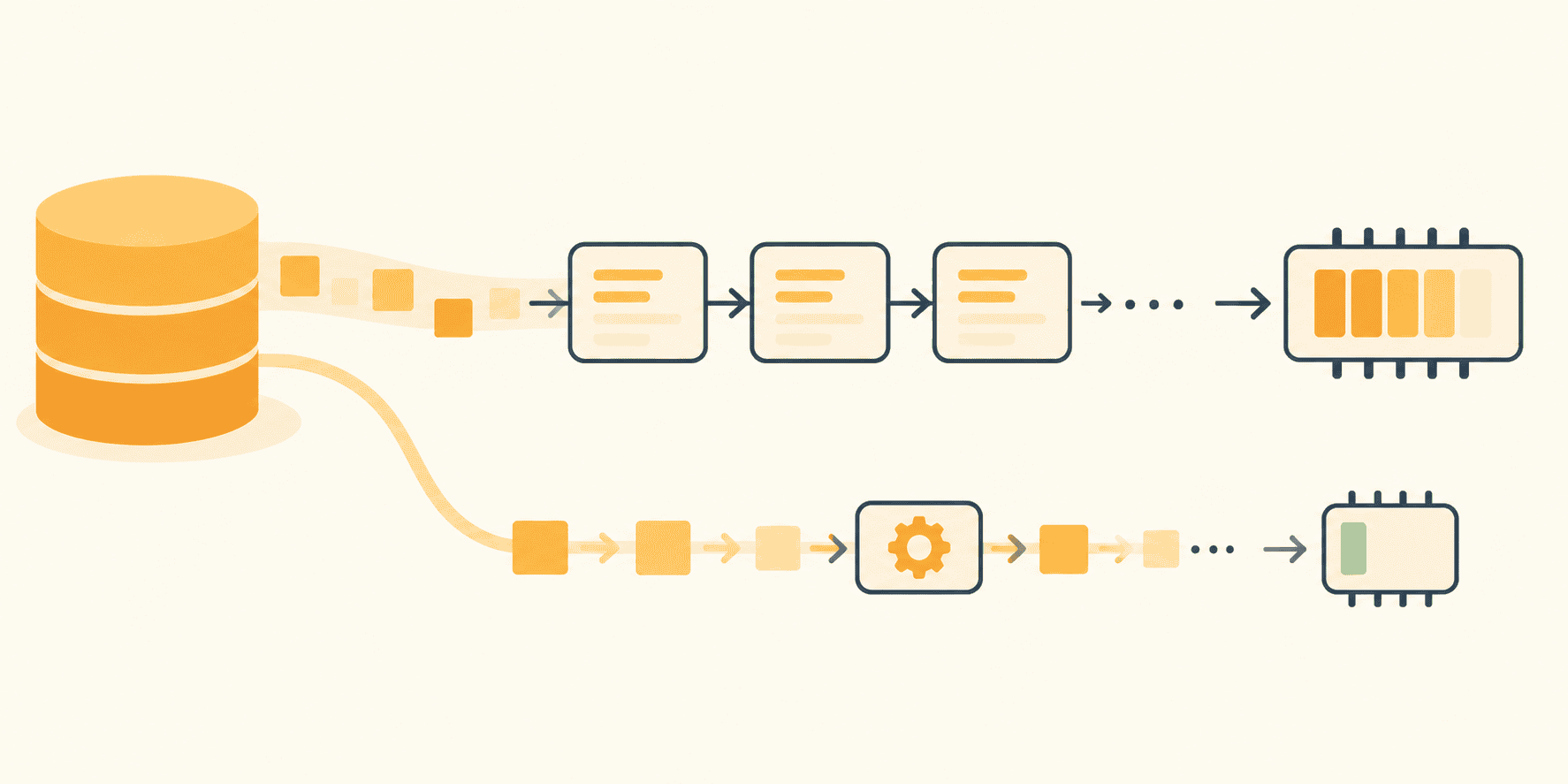
Nobody would flag any of those lines in review. Together they build three lists, and the first one has to hold every record in the file before the filter can start. If each step only needs one record at a time, why make every record exist at once? Python has had the tools to avoid that for over twenty years. Iterators, generator functions, and generator expressions let a pipeline pull one record through every stage and release it before the next one arrives. The trick is keeping the whole path lazy rather than sprinkling yield into one function. Lazy has to hold from the file object at the top to the batch written at the bottom, because a single eager step in between brings the list back.
The tutorial stays in pure Python. Pandas chunking, Spark, Dask, and async streams all solve neighbouring problems. None of them is needed for a log file, an export, or a line-oriented dataset dump that fits on disk but not in RAM.
Iterator vs Iterable: The Contract That Makes Streaming Work
Python’s for loop hides a small contract, and the whole streaming story depends on it. An iterable is something you can ask for an iterator: a list, a string, a dictionary, an open file. The iterator is the thing that actually remembers where you are. When for line in f runs, Python calls iter(f) once, then calls next() on the result over and over until it raises StopIteration. StopIteration is the loop’s normal ending, not an error. The iterator protocol is just two methods. __iter__() hands back the iterator itself, and __next__() either produces the next item or raises StopIteration because there isn’t one.
1
2
3
4
5
6
numbers=iter([10,20,30])
next(numbers)# 10
next(numbers)# 20
next(numbers)# 30
next(numbers)# raises StopIteration
The list still holds all three values. The iterator is not a copy of it but a cursor over it, and the cursor only moves forward. That one property is what makes streaming possible, because a cursor over a 9 GB file needs a small read buffer rather than 9 GB of strings. The forward-only cursor is also what catches people out. Once an iterator has raised StopIteration, the documentation is blunt: it must keep raising it on subsequent calls. An exhausted iterator does not rewind. When a generator appears to return nothing the second time a function loops over it, it wasn’t empty. The first loop consumed it, and the first loop is often a len() check, a debug print, or a list() call someone added while investigating. The fix is to iterate once, or to call the function that creates the generator again.
Start With the File Object Before Writing a Generator
Before writing any generator code, take the memory win the standard library already gives away. A file object is its own iterator, and the tutorial’s description of looping over it is that it is memory efficient, fast, and leads to simple code. f.read() pulls the entire file into one string, and f.readlines() builds a list with one string per line. for line in f reads a buffered chunk at a time and hands you one line.
1
2
3
4
5
6
7
8
9
10
# eager: the whole file becomes a list of strings first
with open("app.log")asf:
lines=f.readlines()
forline inlines:
handle(line)
# lazy: one line in memory at a time
with open("app.log")asf:
forline inf:
handle(line)
For a log with a timestamp, a level, a service name, and a handful of key=value fields, that is already enough to parse and discard irrelevant lines without holding anything. The parser sees one line, decides whether the level or the service matters, and moves on. Notice what did not change: the algorithm. Line-by-line reading solves the memory problem only when the work is itself line-by-line. If the summary needs every record sorted by latency, or deduplicated across the whole week, a file iterator alone does not rescue it. Pretending otherwise is how the list comes back at step two.
Turn Parsing Steps Into Generator Functions
The file iterator handles reading, but parsing and filtering still live in one loop body, which is where scripts grow long and untestable. A generator function splits them into named stages that each stream. Any function containing yield becomes a generator function. Call it and nothing in the body runs yet. What comes back is a generator object, and the body advances one yield at a time as the caller asks for values. That is easy to forget the first time a print statement inside a generator never fires.
read_lines uses yield from to hand every line of each rotated file up to the caller. Three log files therefore behave like one stream, and each file is closed before the next one opens. parse_records turns a line into a dictionary and yields it, only_level passes through the ones that matter, and none of the three knows or cares how large the input is.
What makes this work is suspension. When parse_records reaches yield, the language reference says all local state is retained: the current bindings of local variables, the instruction pointer, the internal evaluation stack. The function is paused mid-loop with match and record still in scope, and it resumes on the next request as if yield had been an ordinary call. Suspension at yield is why a generator holds one record at a time. Record size never enters into it. The function hasn’t reached the next line of the file, so the next record does not exist yet, in memory or anywhere else. When the loop runs out and the function returns, the generator raises StopIteration on the caller’s behalf, and the stages stacked above it drain out one after another.
Each stage can also be tested on its own with a list of three lines. That is a better deal than testing a forty-line loop body by running it against production data.
Keep the Middle of the Pipeline Lazy
Wire the stages together and the pipeline becomes a chain of assignments that do no work until the end:
The two parenthesized expressions are generator expressions, the one-line cousins of generator functions. Where a list comprehension in square brackets builds the whole list, the same expression in parentheses builds a generator that evaluates one element per request. They belong in the small transformations between named stages: a filter with one condition, a projection down to the fields the sink needs.
One point about laziness is worth knowing precisely: the language reference states that the iterable in the leftmost for clause is evaluated immediately, and everything else lazily. So (r for r in errors if ...) evaluates the name errors right away, which is harmless because errors is already a generator. Write (r for r in load_everything() if ...) and load_everything() runs in full at the moment the expression is defined, not when the first value is requested. The generator expression did not make the source lazy, only the filtering.
islice is the tool for looking without consuming. That five-row loop is the fastest sanity check available: five rows come through the whole chain, the loop stops, and the other 9 GB never gets touched. Run the five-row check before every other change to the pipeline. Most of itertools follows the same rule of returning an iterator rather than a list, so chain can glue two sources together and takewhile can cut a stream off at a condition without either one holding anything. Use them when they replace a stage you’d otherwise write by hand, and prefer a plain generator function with a good name whenever that reads better, which it often does.
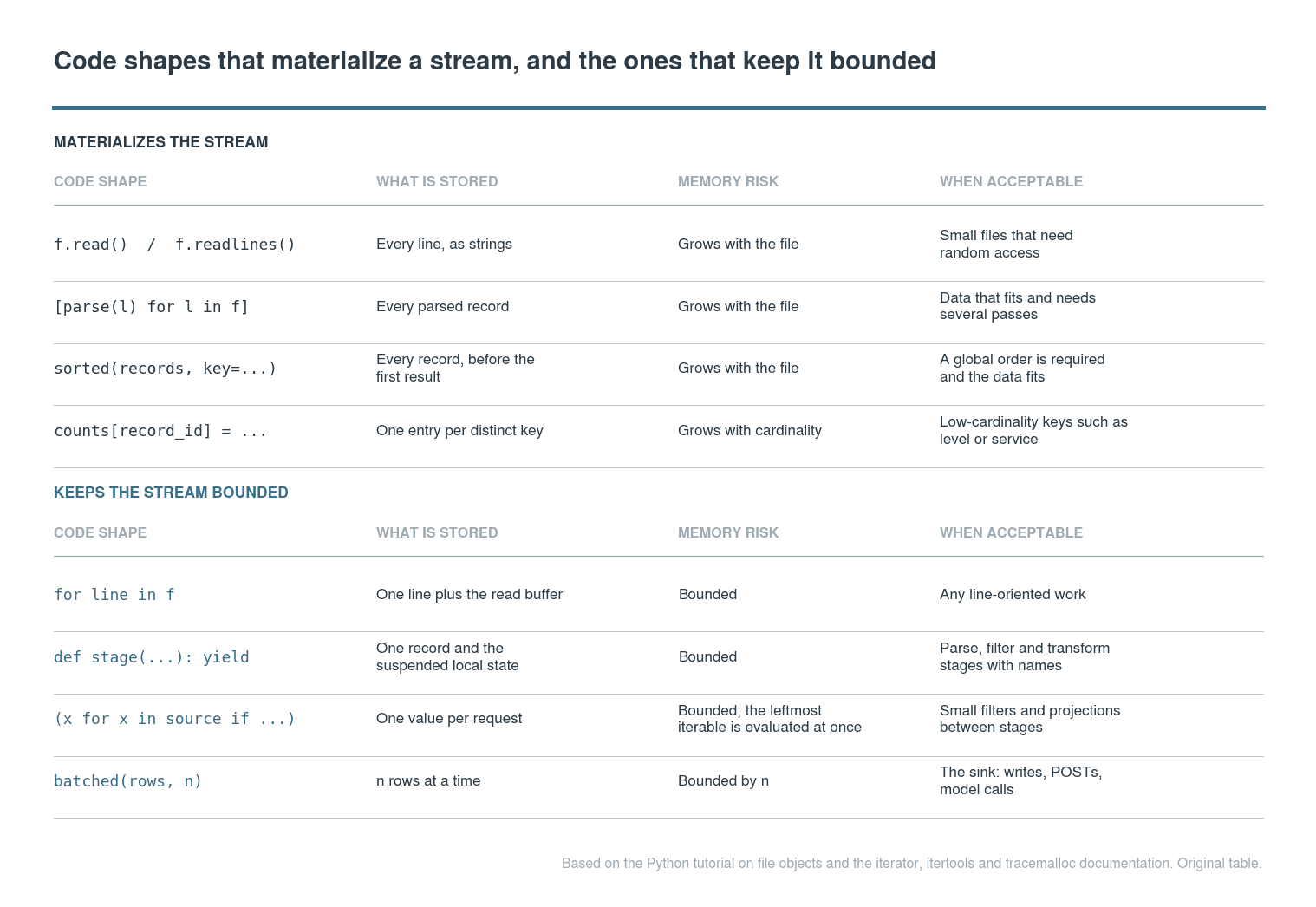
The traps sit at the other end of the chain, and most of them look like tidy code. list(rows) is the obvious one. sorted(rows, key=...) is the same trap with better manners, since a sort cannot return its first element until it has seen the last. A dictionary keyed by request_id, for counting or deduplication, grows with the number of distinct IDs. In a payments log that is close to the number of records, so it is the list from the opening in a different container. Then there are the library calls that materialise on your behalf: build a DataFrame from records, or call json.dumps(list(rows)), and the entire stream is sitting in memory under a friendlier name. Speed is a separate question. Generators aren’t faster than lists, and sum() over a generator does the same work as sum() over a list, sometimes a little more. The benefit is bounded memory and stages you can rearrange, which is a different promise from speed.
The four stages of the pipeline and what each one holds at any moment. Every stage passes one record along and keeps nothing; only the sink materialises, and only a batch at a time. Alt text: left-to-right diagram with a log file feeding a file iterator, a parse generator, a filter and projection generator expression, and a bounded batch sink, each labelled with the memory it holds. Credit: original diagram based on the Python iterator, yield expression and itertools documentation.
Batch Only at the Boundary
Laziness is not a religion. Somewhere the rows have to land: a file, a database, a model that scores them, an API that accepts a POST. Most of those consumers want a group rather than a single row, and a bounded group is the correct thing to materialise. The rule is that the batch has a size you chose, and nothing upstream of it is ever whole.
Since Python 3.12 the standard library has had itertools.batched(), which is this pattern done properly. It pulls just enough from the input to fill a tuple of n, hands the tuple over, and only then pulls the next one, with a shorter final tuple when the input runs out.
On 3.11 or earlier, the same behaviour is a four-line recipe over islice:
1
2
3
4
def batched(iterable,n):
it=iter(iterable)
whilebatch:=tuple(islice(it,n)):
yield batch
A batch of a thousand rows is, of course, still a list-shaped object sitting in memory. The difference from the opening script is that a thousand is a number you picked. It stays a thousand whether the file has ten thousand lines or a billion, and the tuple is garbage the moment the next one arrives. Name the boundary in the code as well. A function called write_batches or send_batches tells the next reader where the stream deliberately stops being a stream. That matters more than it sounds when someone adds a sorted() to it six months later. Small data is the other legitimate list. For a file that fits comfortably in memory and needs random access or several passes, a list is the right structure and a generator is ceremony.
One honest caveat: some jobs cannot be streamed, and no amount of generator plumbing changes that. A global sort, exact deduplication across the whole file, a percentile over every latency value: anything where the answer for the first record depends on the last needs every record. The alternatives are an algorithm that approximates from a sample, or an external tool that sorts on disk. Recognise that early, because a pipeline that streams beautifully into a sorted() at the end has the original memory bug with more functions in front of it.
Measure the Memory Story Before Trusting It
A pipeline that looks lazy and a pipeline that is lazy are different objects, and the only way to tell them apart is to measure. The standard library’s tracemalloc traces the memory blocks Python allocates and reports the current and peak size as a two-value tuple.
Of the two, peak is the one to watch. Current memory after the job finishes tells you whether something leaked, which is useful but a different question. Peak is what the process needed at its worst moment, and it is the number a container limit or an OOM killer compares against. Running both versions against a synthetic 200,000-line log of about 17 MB on one laptop, the eager script from the opening peaked at 198 MB. The streaming version peaked at 0.4 MB, and that second number barely moves as the file grows. Those are one run’s figures rather than a benchmark, and the shape of the comparison is the point: the eager peak scales with the file, the lazy peak scales with the batch.
Two caveats keep the measurement grounded. tracemalloc sees allocations made through Python’s allocators, so a C extension managing its own buffers, the operating system’s file cache, and anything happening in another process are outside its view. Tracing also has a cost of its own, which grows with the number of frames you ask it to store. For a whole-process figure, watch resident memory from the outside as well.
When peak memory refuses to fall after a refactor, the cause is nearly always one of two things. Either a reference is escaping the stream, or a downstream call is materialising it internally. The escaping reference is typically a list or dictionary outside the generator that keeps every record alive, such as a seen set of request IDs or a debug list of interesting rows. Check the three places in order. The source should be a file iterator and not a readlines(). No stage in the middle should return a list or call sorted() on the stream. Finally, the sink should accept an iterable rather than demand a sequence, which is a question worth asking of any library the rows are handed to.
The code shapes that materialise a stream and the ones that keep it bounded, with the case where each is acceptable. Alt text: four-column table comparing readlines, list comprehensions, sorted and dictionary accumulation against file iteration, generator functions, generator expressions and bounded batches, with what each stores, its memory risk and when it is acceptable. Credit: original table based on the Python iterator, itertools and tracemalloc documentation.
Keep Laziness All the Way Through the Data Path
The operating rule is staged. Iterate the file object before writing any code of your own. Turn parsing and filtering into generator functions with names. Compose the small transformations with generator expressions and itertools, remembering that the leftmost iterable runs immediately. Materialise only at the sink, in batches of a size you chose, inside a function whose name says so. Then measure the peak, because one eager step anywhere in that chain — a stray list(), a sorted(), a library that wants a sequence — is the whole memory bug back again.
The payoff extends past logs. The same four stages handle a CSV export that outgrew the spreadsheet it came from, an event dump pulled from a message queue, or the JSONL file feeding a preprocessing or fine-tuning step. That last case is where most “the dataset doesn’t fit” problems in machine learning work actually start. Streaming is about how records move, and once a record has been parsed and trusted, structured application data is a separate question about what it becomes.
A good streaming pipeline is also a readable one. Someone opening the module should be able to point at where data enters, where it is filtered, where it is transformed, and the one place it is intentionally made whole. If they can’t, the next memory bug is already in the module; it just hasn’t met a large enough file.








No comments yet.