In this article, you will learn how to build a multi-modal RAG pipeline in Python that retrieves and reasons over both text and images extracted from complex documents.
Topics we will cover include:
How to parse a PDF into separate text and image elements using the unstructured library.
How to generate searchable text summaries for extracted images using GPT-4o, and store everything in a multi-vector retrieval system.
How to query the pipeline with a multimodal prompt that passes both text chunks and raw images to GPT-4o for a grounded final answer.
Standard retrieval-augmented generation works great for plain text. But feed it a PDF packed with embedded charts, scanned diagrams, or data tables, and things fall apart fast. Text-based chunking destroys table formatting and skips images, so your pipeline ends up answering questions from an incomplete picture of the document.
A multi-modal RAG pipeline fixes this by treating images as first-class retrievable objects alongside text. In this tutorial, we’ll build one in Python using LangChain, the unstructured library, and the OpenAI API. We’ll parse a complex PDF into separate text and image elements, generate searchable summaries for each image, store everything in a multi-vector retrieval system, and query it with a prompt that returns both text and visual evidence to GPT-4o for a final answer.
As covered in The Multimodal AI Guide on KDnuggets, modern AI systems are designed to reason across content types natively. This tutorial applies that principle to a practical problem: documents that mix prose, tables, and embedded images. Where the MLM multi-modal RAG implementation takes a local PyTorch approach suited to audio and image-heavy workloads, this guide uses an API-driven architecture that runs on standard hardware and fits business document use cases well.
Prerequisites and Setup
You’ll need an OpenAI API key and the following packages installed. The poppler-utils system dependency is required by unstructured to extract images from PDFs.
Set your API key as an environment variable before running any code:
1
2
import os
os.environ["OPENAI_API_KEY"]="your-api-key-here"
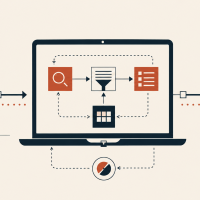
The pipeline has four stages: parse, summarize, store, and retrieve. Each one maps to one of the code blocks below.
Step 1: Parsing the Document into Text and Image Elements
The unstructured library does the heavy lifting here. Its partition_pdf() function reads the document and classifies each element by type. It separates paragraphs, tables, and embedded images instead of treating the whole file as a flat stream of characters.
1
2
3
4
5
6
7
8
9
10
from unstructured.partition.pdf import partition_pdf
extract_image_block_output_dir tells unstructured where to save extracted image files, while extract_image_block_types controls which element types get pulled out. Next, separate the returned elements into text and image lists:
1
2
3
4
5
6
7
8
9
10
text_elements=[]
image_paths=[]
forel inraw_elements:
if"CompositeElement"instr(type(el)):
text_elements.append(str(el))
elif"Image"instr(type(el)):
image_paths.append(el.metadata.image_path)
print(f"Extracted {len(text_elements)} text chunks, {len(image_paths)} images")
The loop separates composite text chunks from image elements, storing the image file paths for the next step.
Step 2: Generating Searchable Summaries for Each Image
Text-based vector databases can’t index raw images, so each image needs a text representation that captures its content in a way that’s retrievable by a natural language query. This step passes every extracted image to GPT-4o with a prompt designed to produce dense, searchable descriptions.
1
2
3
4
import base64
from openai import OpenAI
client=OpenAI()
With the client ready, define a function that base64-encodes each image and sends it to GPT-4o with a retrieval-focused prompt:
Each summary becomes the searchable proxy for its source image. The raw image file is kept separately and retrieved by reference when a query matches its summary.
A note on costs: every extracted image triggers a GPT-4o API call at indexing time. If you’re working with large documents full of embedded logos or icons, consider filtering out images below a minimum file size before passing them to summarize_image().
Step 3: Building the Multi-Vector Store
This is where the architecture diverges from standard RAG. A MultiVectorRetriever maintains two stores: a vector store that holds embedded text chunks and image summaries for similarity search, and a document store that holds the raw source content linked to those embeddings through unique IDs.
1
2
3
4
5
6
7
8
9
10
11
12
13
import uuid
from langchain_openai import OpenAIEmbeddings
from langchain_chroma import Chroma
from langchain.storage import InMemoryStore
from langchain.retrievers.multi_vector import MultiVectorRetriever
This initializes both stores and generates a unique ID for each element. The vector store holds the searchable summaries; the document store holds the raw content. With the IDs in place, populate both:
Wrapping raw content in Document objects with an explicit type field keeps the retrieval logic in Step 4 clean. Each ID links an embedded summary in the vector store to its corresponding raw Document in the document store.
Step 4: Querying the Pipeline with Multimodal Retrieval
At query time, the retriever embeds the question and finds the closest matches across both text and image summaries. If a match points to an image path, the raw file is loaded and passed to GPT-4o alongside any retrieved text. GPT-4o then generates an answer grounded in both content types.
The metadata check routes each retrieved Document cleanly: image paths get opened and base64-encoded, while text chunks pass through as-is. The function then assembles both into a single multimodal GPT-4o call:
1
2
3
4
5
6
7
response=client.chat.completions.create(
model="gpt-4o",
messages=[{"role":"user",
"content":text_content+image_content+
[{"type":"text","text":question}]}]
)
returnresponse.choices[0].message.content
Call the function with any question about the document:
1
2
answer=query_pipeline("What does the revenue chart show for Q3?")
print(answer)
GPT-4o reasons across all retrieved evidence — both text and images — before returning a final answer.
Conclusion
This pipeline handles what standard RAG can’t: documents where the most important information lives in charts, diagrams, or embedded graphics. The four stages are: parse with unstructured, summarize images with GPT-4o, store with a multi-vector retriever, and query with a multimodal prompt. This pattern scales to research papers, financial reports, product manuals, and any document type that mixes text with visuals.
From here, you can extend the pipeline by adding re-ranking to improve retrieval precision, persisting the Chroma vector store to disk for production use, or exploring vision-language models like ColPali that skip the parsing step by embedding document pages as images.




No comments yet.