

Let’s Build a RAG-Powered Research Paper Assistant
Image by Author | Ideogram
In the era of generative AI, people have relied on LLM products such as ChatGPT to help with tasks. For example, we can quickly summarize our conversation or answer the hard questions. However, sometimes, the generated text is not accurate and irrelevant.
The RAG technique is emerging to help solve the problem above. Using the external knowledge source, an LLM can gain context not present in its data training. This method will enhance model accuracy and allow the model to access real-time data.
As the technique improves output relevancy, we can build a specific project around them. That’s why this article will explore how we can build a research paper assistant powered by RAG.
Preparation
For starters, we need to create a virtual environment for our project. You can initiate it with the following code.
|
1 |
python venv -m your_virtual_environment_name |
Activate the virtual environment, and then install the following libraries.
|
1 |
pip install streamlit PyPDF2 sentence-transformers chromadb litellm langchain langchain-community python-dotenv arxiv huggingface_hub |
Additionally, don’t forget to acquire a Gemini API key and a HuggingFace token to access the repository, as we will use them.
Create the file called app.py for building the assistant and .env file where you put the API key.
With everything in place, let’s start to build the assistant.
RAG-Powered Research Paper Assistant
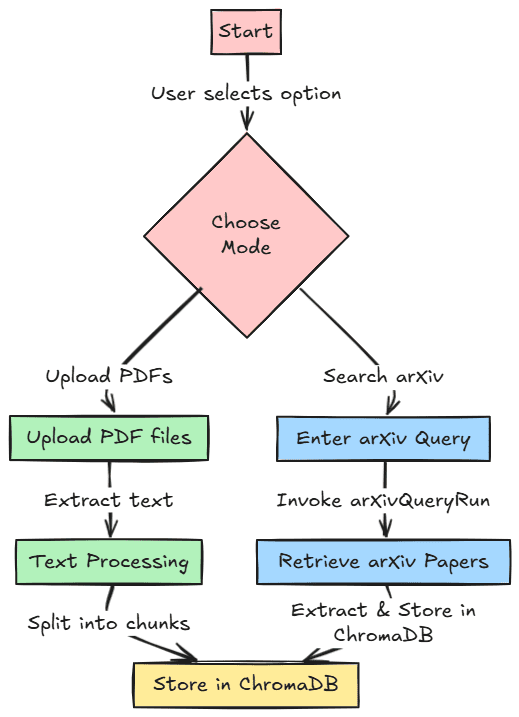
Let’s start building our project. We will develop our research paper assistant with two different features for references. First, we can upload our PDF research paper and store it in a vector database for users to retrieve later. Second, we could search research papers within the arXiv paper database and store them in the vector database.
The image below shows this workflow for reference. The code for this project is also stored in the following repository.
First, we must import all the required libraries and initiate all the environment variables we used for the project.
|
1 2 3 4 5 6 7 8 9 10 11 12 13 14 15 16 17 18 19 20 |
import os import PyPDF2 import streamlit as st from sentence_transformers import SentenceTransformer import chromadb from litellm import completion from langchain.text_splitter import RecursiveCharacterTextSplitter from langchain_community.tools import ArxivQueryRun from dotenv import load_dotenv load_dotenv() gemini_api_key = os.getenv("GEMINI_API_KEY") huggingface_token = os.getenv("HUGGINGFACE_TOKEN") if huggingface_token: login(token=huggingface_token) client = chromadb.PersistentClient(path="chroma_db") text_embedding_model = SentenceTransformer('all-MiniLM-L6-v2') arxiv_tool = ArxivQueryRun() |
After we import all the libraries and initiate the variables, we will create useful functions for our project.
Using the code below, we will create a function to extract text data from PDF files.
|
1 2 3 4 5 6 7 |
def extract_text_from_pdfs(uploaded_files): all_text = "" for uploaded_file in uploaded_files: reader = PyPDF2.PdfReader(uploaded_file) for page in reader.pages: all_text += page.extract_text() or "" return all_text |
Then, we develop a function to accept the previously extracted text and store it in the vector database. The function will also preprocess the raw text by splitting it into chunks.
|
1 2 3 4 5 6 7 8 9 10 11 12 13 14 15 16 17 18 19 20 21 |
def process_text_and_store(all_text): text_splitter = RecursiveCharacterTextSplitter( chunk_size=500, chunk_overlap=50, separators=["\n\n", "\n", " ", ""] ) chunks = text_splitter.split_text(all_text) try: client.delete_collection(name="knowledge_base") except Exception: pass collection = client.create_collection(name="knowledge_base") for i, chunk in enumerate(chunks): embedding = text_embedding_model.encode(chunk) collection.add( ids=[f"chunk_{i}"], embeddings=[embedding.tolist()], metadatas=[{"source": "pdf", "chunk_id": i}], documents=[chunk] ) return collection |
Lastly, we prepare all the functions for retrieval with semantic search using embedding and generate the answer using the retrieved documents.
|
1 2 3 4 5 6 7 8 9 10 11 12 13 14 15 |
def semantic_search(query, collection, top_k=2): query_embedding = text_embedding_model.encode(query) results = collection.query( query_embeddings=[query_embedding.tolist()], n_results=top_k ) return results def generate_response(query, context): prompt = f"Query: {query}\nContext: {context}\nAnswer:" response = completion( model="gemini/gemini-1.5-flash", messages=[{"content": prompt, "role": "user"}], api_key=gemini_api_key ) return response['choices'][0]['message']['content'] |
We are now ready to build our RAG-powered research paper assistant. To develop the application, we will use Streamlit to build the front-end application, where we can choose whether to upload a PDF file or search arXiv directly.
|
1 2 3 4 5 6 7 8 9 10 11 12 13 14 15 16 17 18 19 20 21 22 23 24 25 26 27 28 29 30 31 32 33 34 35 36 37 38 39 40 41 42 43 44 45 |
def main(): st.title("RAG-powered Research Paper Assistant") # Option to choose between PDF upload and arXiv search option = st.radio("Choose an option:", ("Upload PDFs", "Search arXiv")) if option == "Upload PDFs": uploaded_files = st.file_uploader("Upload PDF files", accept_multiple_files=True, type=["pdf"]) if uploaded_files: st.write("Processing uploaded files...") all_text = extract_text_from_pdfs(uploaded_files) collection = process_text_and_store(all_text) st.success("PDF content processed and stored successfully!") query = st.text_input("Enter your query:") if st.button("Execute Query") and query: results = semantic_search(query, collection) context = "\n".join(results['documents'][0]) response = generate_response(query, context) st.subheader("Generated Response:") st.write(response) elif option == "Search arXiv": query = st.text_input("Enter your search query for arXiv:") if st.button("Search ArXiv") and query: arxiv_results = arxiv_tool.invoke(query) st.session_state["arxiv_results"] = arxiv_results st.subheader("Search Results:") st.write(arxiv_results) collection = process_text_and_store(arxiv_results) st.session_state["collection"] = collection st.success("arXiv paper content processed and stored successfully!") # Only allow querying if search has been performed if "arxiv_results" in st.session_state and "collection" in st.session_state: query = st.text_input("Ask a question about the paper:") if st.button("Execute Query on Paper") and query: results = semantic_search(query, st.session_state["collection"]) context = "\n".join(results['documents'][0]) response = generate_response(query, context) st.subheader("Generated Response:") st.write(response) |
In the code above, you will note that our two features have been implemented. To start the application, we will use the following code.
|
1 |
streamlit run app.py |
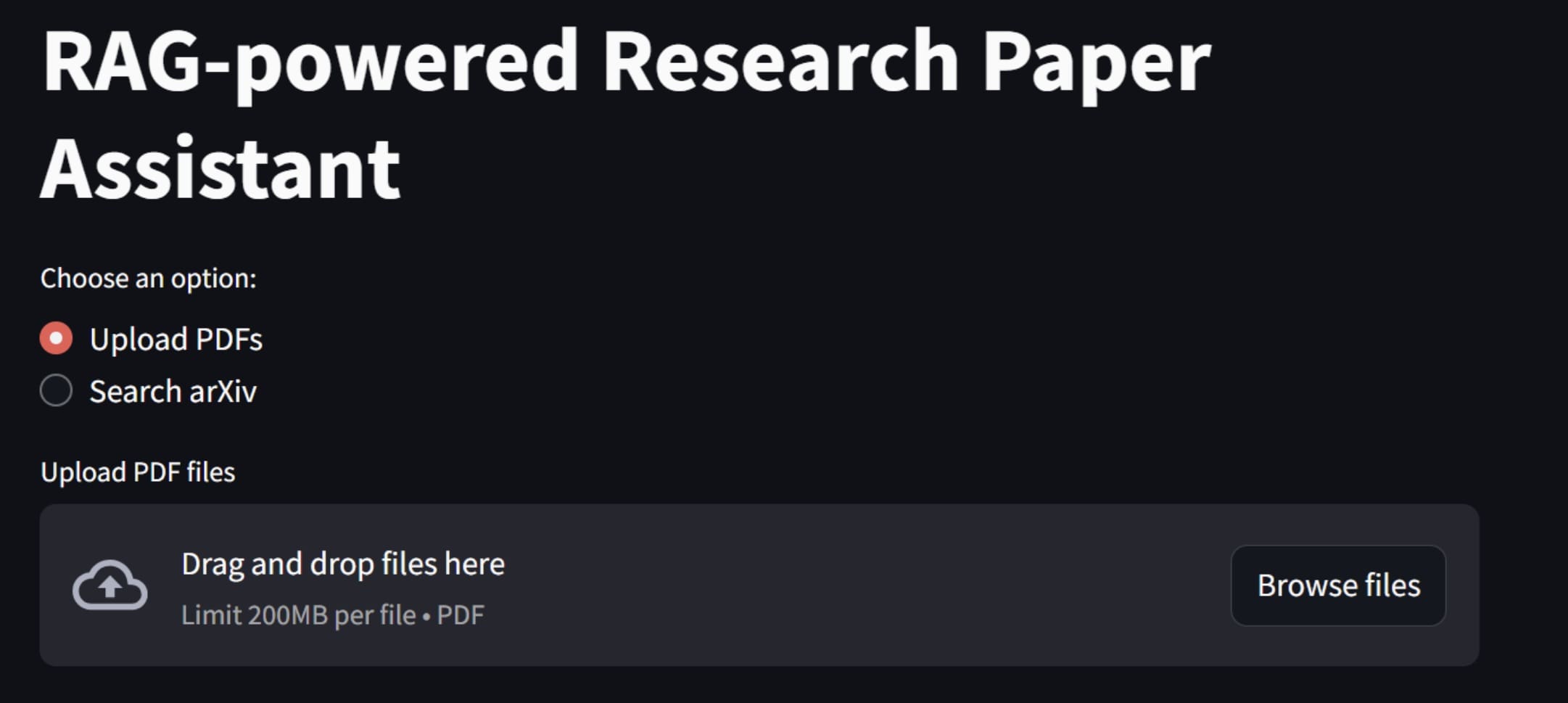
You will see the above application in your web browser. To use the first feature, you can try uploading a PDF research paper file, and the application will process it.
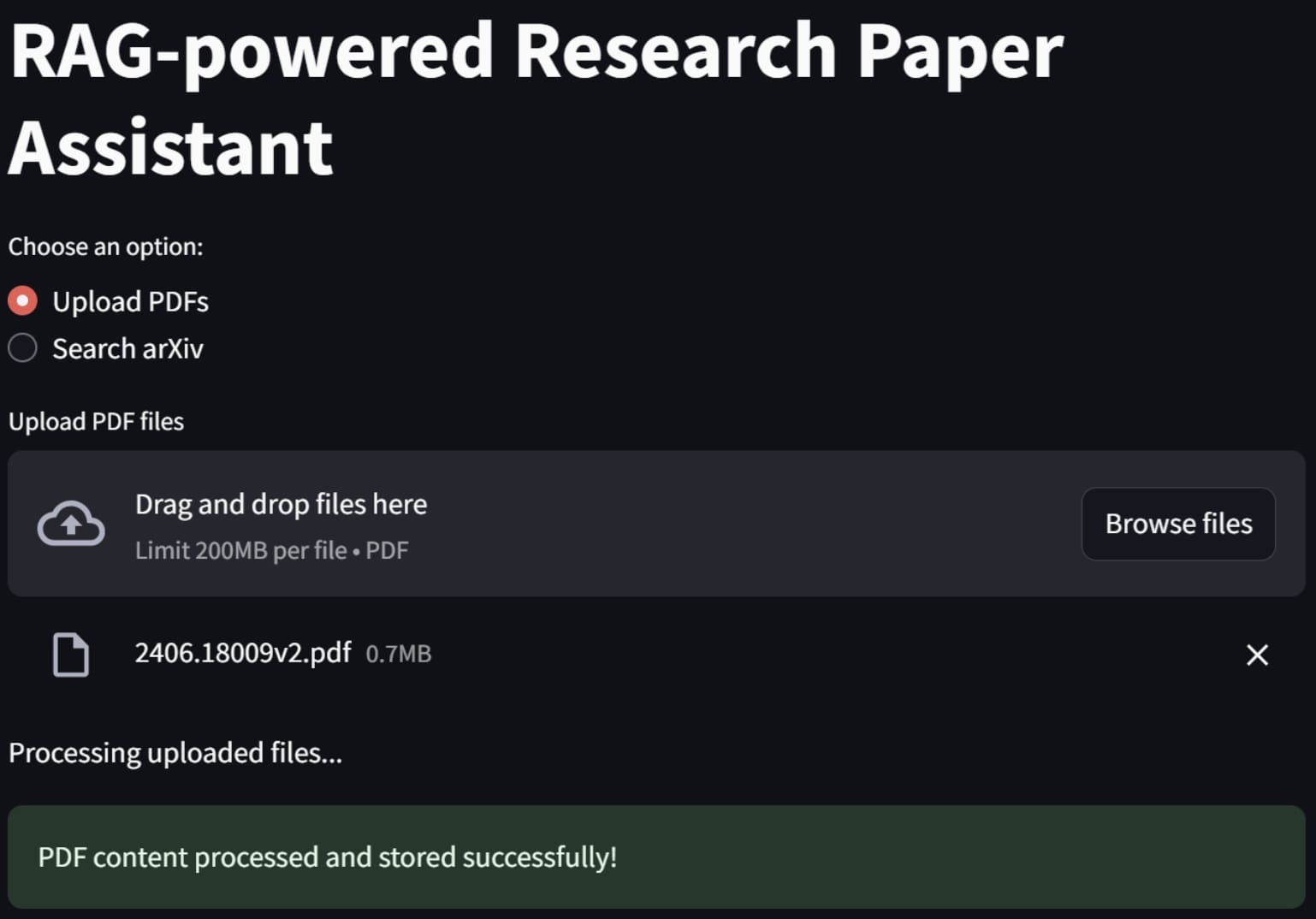
If it’s a success, an alert will signify that the data have been processed and stored within the vector database.
Next, try to enter any query to ask something related to our research paper, and it will generate something like the following image.
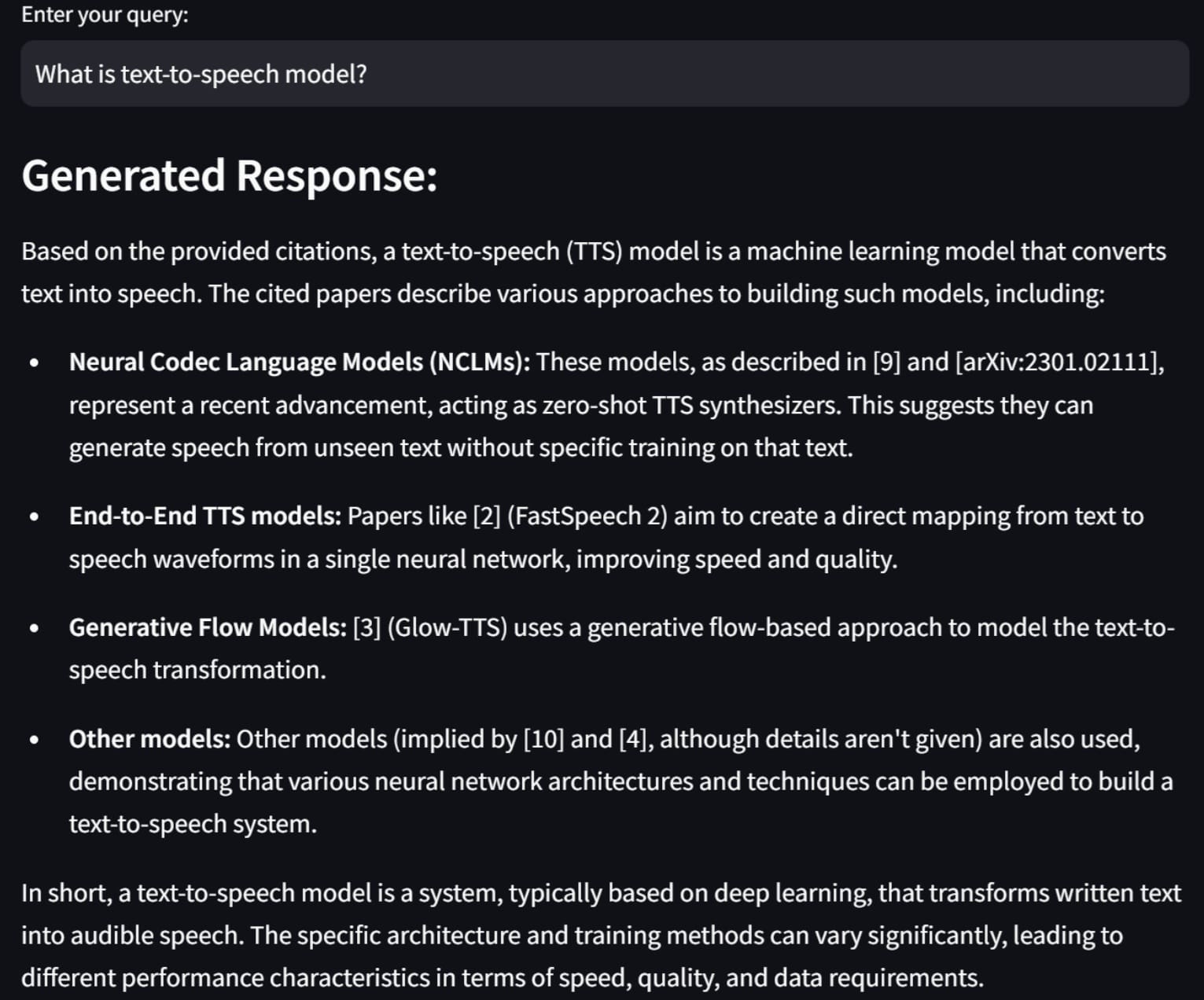
The result is generated with the context we are given, as it references any of our documents.
Let’s try out the arXiv paper search feature. For example, here is how we search the paper about MLOps and a sample result.

If we about a paper we have previously searched, we will see something similar to the image below.
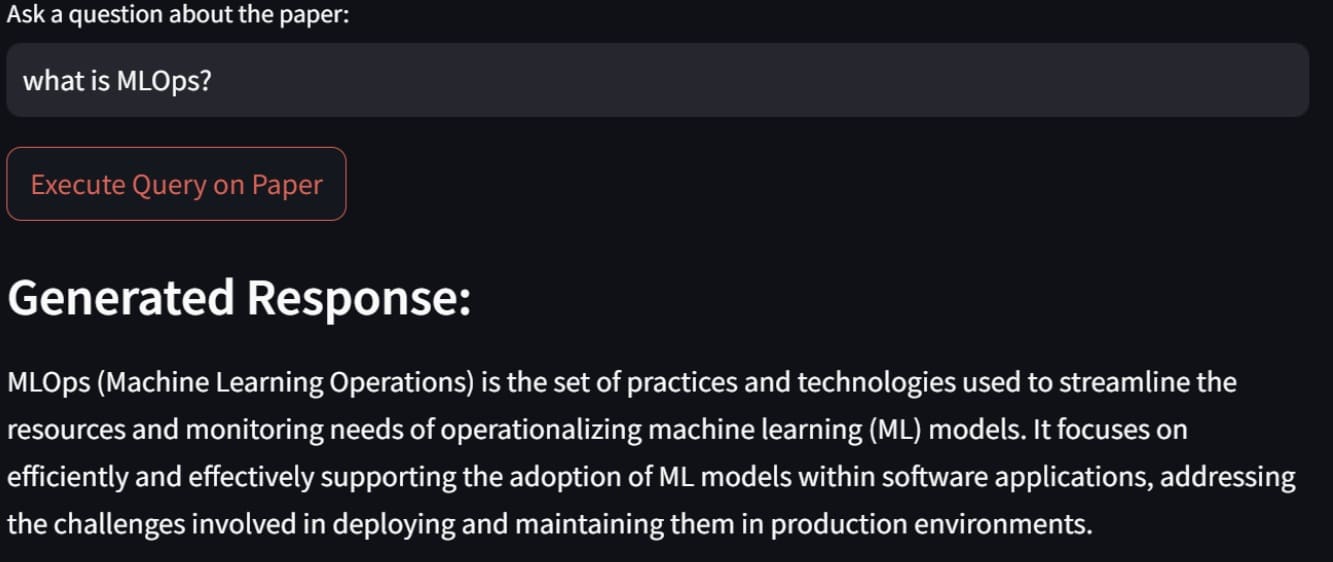
And that, my friends, is how we build a RAG-powered research paper assistant. You can tweak the code even further to have more specific features.
Conclusion
RAG is a generative AI technique that enhances the accuracy and relevance of responses by leveraging external knowledge sources. RAG can be used to build valuable applications, with one practical example being a RAG-powered research paper assistant.
In our adventure we have used Streamlit, LangChain, ChromaDB, the Gemini API, and HuggingFace models for embedding and text generation, which combined well to build our app, and we were able to upload our PDF files or search for papers directly on arXiv.
I hope this has helped!






Your tutorial is very good.
Thank you very much for sharing.
You are very welcome Eddy!
can it be implemented on colab?
Yes, **absolutely**, you can **implement a RAG-powered (Retrieval-Augmented Generation) Research Paper Assistant on Google Colab**!
In fact, Colab is a really good choice to quickly prototype and run such a system because:
– It supports **Python** (which you’ll most likely use).
– It can install all the needed libraries like **LangChain**, **Huggingface Transformers**, **FAISS**, **ChromaDB**, etc.
– It gives you **free GPUs or TPUs** if you later want to speed things up (especially helpful if you use a large LLM locally).
– You can **upload documents (PDFs, text files)** into Colab easily.
—
**Typical High-Level Steps to Build RAG Assistant on Colab:**
| Step | What You Do |
|:—|:—|
| 1 | Install libraries:
pip install langchain faiss-cpu chromadb sentence-transformers huggingface_hub|| 2 | Load your research papers (PDF or text) into Colab. |
| 3 | Split papers into **chunks** (small passages). |
| 4 | Embed chunks into a **vector database** (FAISS, ChromaDB, etc.). |
| 5 | At query time: embed the **user’s question**, retrieve similar document chunks. |
| 6 | Feed the retrieved chunks + the user’s question into an **LLM** (like
gpt-3.5-turbo, or a smaller model if you’re running fully locally). || 7 | Display the generated answer back. |
—
**Special Notes if you’re using Colab:**
– If you’re using **OpenAI API** (like GPT-3.5) for the final generation step, you’ll need an API key (
openaipackage).– If you want everything **100% local**, you can load small open-source models like **Llama 2**, **Mistral 7B**, or **Phi-2** using Huggingface Transformers.
– Watch the **RAM limit** on Colab (especially if embedding many documents or running large models).
—
Thanks for sharing i have tried to implement the same but i keep getting this error :: During handling of the above exception, another exception occurred:
Traceback (most recent call last):
File “/opt/homebrew/lib/python3.10/site-packages/streamlit/watcher/local_sources_watcher.py”, line 217, in get_module_paths
potential_paths = extract_paths(module
Got it — you’re getting an error related to Streamlit, specifically:
During handling of the above exception, another exception occurred:
Traceback (most recent call last):
File “/opt/homebrew/lib/python3.10/site-packages/streamlit/watcher/local_sources_watcher.py”, line 217, in get_module_paths
potential_paths = extract_paths(module
This error usually happens **early**, when Streamlit is **reloading** your app (like when you edit/save the file), **and it tries to watch your modules** for changes but encounters something strange.
—
✅ **Important context** about this specific error:
–
streamlit/watcher/local_sources_watcher.pyis the internal watcher Streamlit uses to auto-reload when code changes.– If you import a **module that was not properly installed**, or if there’s a **circular import**, or if something in your **Python environment is messed up**, the watcher gets confused.
– Mac M1/M2/M3 (Apple Silicon) + Homebrew setups are a little more prone to this, because the environment sometimes has weird paths (
/opt/homebrew/...instead of/usr/local/...).—
### 🔥 Possible reasons you’re seeing this:
1. **Streamlit caching/auto-reload bug** (very common with Streamlit if an exception occurs inside
st.cacheor after file edits).2. **Bad module import**: maybe your RAG code imports something weirdly (e.g., dynamic import, or wrong directory structure).
3. **Missing file**: if you reference a file that Streamlit expects (e.g., a .py, .txt, .json file) and it can’t find it.
4. **You have a syntax error or crash earlier**, and Streamlit is just crashing harder trying to reload it.
—
### 🛠️ **How to Fix or Debug It:**
1. **Restart Streamlit manually**
– Instead of letting Streamlit auto-reload after changes, stop it (
CTRL+C) and run again:bash
streamlit run your_app.py
– Sometimes auto-reload leads to broken states.
2. **Check your imports carefully**
– Make sure you are not dynamically importing anything funky.
– Check if you are importing local modules correctly.
3. **Make sure all files exist**
– If your app expects documents, config files, models — double-check the paths.
4. **Add Exception Handling** early
– Before big imports or functions, wrap things in
try-exceptto avoid hard crashes while developing.5. **Environment Issues**
– Are you using a **virtualenv** (
venv) or **conda env**?– If not, create one (to isolate packages properly):
bash

     python3 -m venv venv

     source venv/bin/activate

     pip install streamlit

     pip install (your other libraries)
6. **Update Streamlit**
– Some older Streamlit versions have more fragile watchers.
– Try updating:
bash

     pip install --upgrade streamlit
—
### 🔥 **Example of the root cause if you copied a RAG project**:
If you followed a tutorial like “Let’s Build a RAG-Powered Research Paper Assistant”, the code often **reads a folder of PDFs** or **calls HuggingFace embeddings**.
If you forgot to:
– Create a
/documents/folder– Provide an
.envfile for keys– Install the right vector store library
– Correctly load the model
Then the initial load fails → Streamlit watcher tries to reload → and you get weird watcher errors.
—
### ❓ To help you more precisely:
Can you tell me:
– What command exactly did you run? (
streamlit run ...)– Did your app **run partially** and then crash, or **never start**?
– Can you show **5–10 lines of the real code** near where the error happens?
(*You can blur API keys or sensitive info — I just need structure.*)
—