
In this article, you will learn how to sandbox the code an AI agent writes by running it in a limited subprocess, a hardened Docker container, and a Firecracker microVM, and how to compare their safety and latency.
Topics we will cover include:
- How to give a code-writing agent a single execution tool backed by interchangeable sandbox backends.
- How subprocess limits, Docker flags, and E2B microVMs each contain CPU, memory, process, disk, file, and network attacks.
- How to test every tier against the same hostile programs and measure the latency cost of stronger isolation.
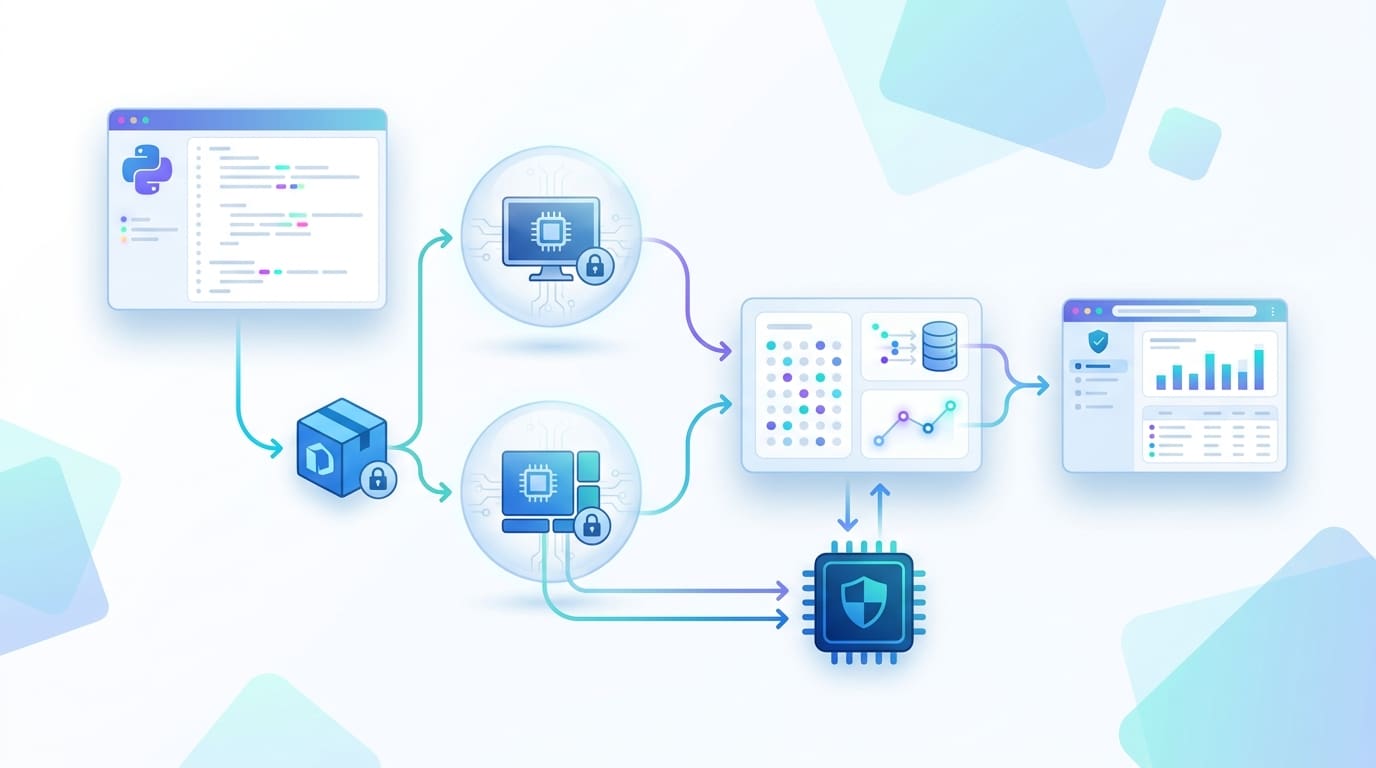
An agent that writes and runs code is only as safe as the place that code runs. Sandboxing AI agent code execution means putting a boundary around that place, and the boundary you choose decides what a bad program can reach. This article gives a code-writing agent a real execution tool, then runs it three ways: a limited subprocess, a Docker container, and a Firecracker microVM. You will test each against the same hostile programs and compare safety with latency. If you would rather start from hosted options, check out this article that covers five code sandboxes for your AI agents. Here we build the layers ourselves, so you can see what those platforms do underneath.
Three Isolation Levels
Untrusted code can eat resources, read secrets, call internal services, or break out of its boundary. The tiers differ in where that boundary sits. A subprocess is the lightest option: a child process with limits on CPU, memory, and file size, sharing the host’s kernel and files. A container adds namespaces and cgroups, yet it is still a set of processes on the host’s kernel, which is why Docker’s own docs note that a container has no resource limits unless you set them. Escapes happen: in November 2025, three runc vulnerabilities let attackers break out of containers. A microVM gives each sandbox its own kernel behind a hypervisor. Docker describes this as a hardware boundary, and AWS says its Firecracker-based Lambda MicroVMs share no kernel between sessions. One more point from Docker’s post applies to every tier: file access, network policy, and secrets should be defined before the agent runs, by infrastructure and not by the agent.
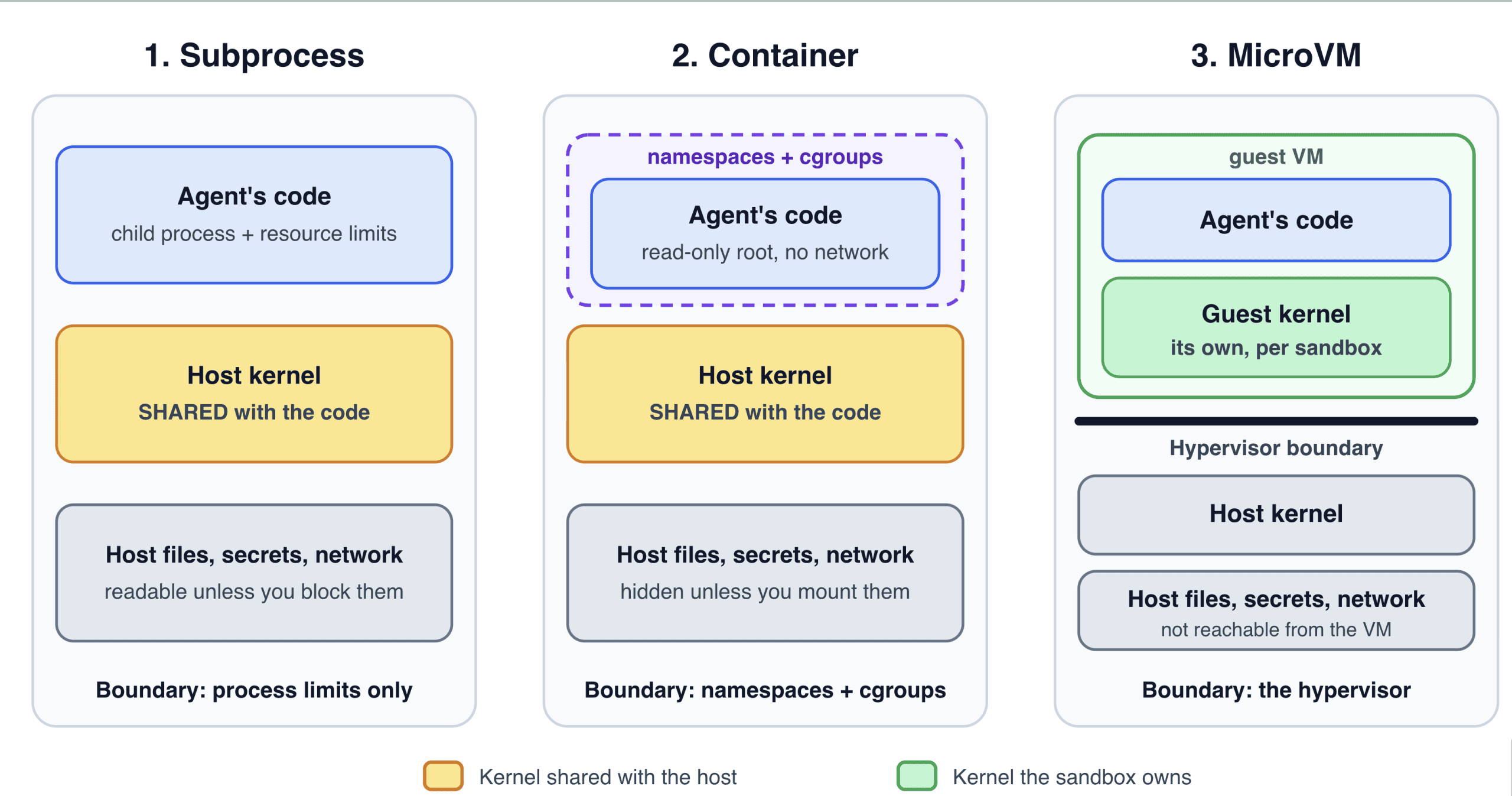
Subprocess-Container-MicroVM
Image by Author
Setup
You need Python 3.10 or newer. The subprocess tier uses Linux features (resource limits and unshare), so run it on Linux or in WSL. The Docker tier needs Docker installed. The microVM tier needs an E2B account and API key. The agent loop needs an Anthropic API key, but you can skip it and go straight to the tests.
|
1 2 3 4 |
pip install anthropic e2b-code-interpreter docker pull python:3.12-slim export ANTHROPIC_API_KEY="your-key-here" export E2B_API_KEY="your-key-here" |
The first line installs both SDKs. The second downloads the container image now, so the first run doesn’t include the download. The last two store your keys, which the SDKs read from the environment. Put the four files below in one folder: sandbox.py, agent.py, attacks.py, and bench.py.
Step 1: Give the Agent an Execution Tool
The agent gets one tool, run_python. Every call goes through a sandbox object, so changing tiers never touches the agent.
|
1 2 3 4 5 6 7 8 9 10 11 12 13 14 15 16 17 18 19 20 21 22 23 24 25 26 27 28 29 30 31 32 33 34 35 36 37 38 |
# agent.py import json from dataclasses import asdict import anthropic from sandbox import SubprocessSandbox SYSTEM = "You are a data analyst. Solve tasks by writing Python and running it with the run_python tool." TOOL = { "name": "run_python", "description": "Run Python code in a sandbox. Returns stdout, stderr and the exit code. Files do not persist.", "input_schema": {"type": "object", "properties": {"code": {"type": "string"}}, "required": ["code"]}, } def run_agent(task, sandbox, model="claude-sonnet-5-5", max_turns=6, client=None): client = client or anthropic.Anthropic() messages = [{"role": "user", "content": task}] for _ in range(max_turns): reply = client.messages.create(model=model, max_tokens=4000, system=SYSTEM, tools=[TOOL], messages=messages) messages.append({"role": "assistant", "content": reply.content}) if reply.stop_reason != "tool_use": return "".join(block.text for block in reply.content if block.type == "text") results = [] for block in reply.content: if block.type == "tool_use": outcome = sandbox.run(block.input["code"]) # the model's code never runs in this process results.append({"type": "tool_result", "tool_use_id": block.id, "content": json.dumps(asdict(outcome)), "is_error": outcome.exit_code != 0}) messages.append({"role": "user", "content": results}) return "Stopped: turn limit reached." if __name__ == "__main__": task = "Compute the mean and standard deviation of the first 1,000 square numbers." print(run_agent(task, SubprocessSandbox())) |
TOOL describes run_python to the model: it takes a string of code and returns stdout, stderr, and an exit code. run_agent loops. It sends the conversation, and when the model asks for the tool, it hands the code to sandbox.run and sends the result back as a tool_result, flagged as an error when the exit code is not zero. The model’s code never runs in this process, and anything with a run(code) method works as the sandbox.
Step 2: Tier One, a Limited Subprocess
The first part of sandbox.py holds the shared result type and the subprocess backend.
|
1 2 3 4 5 6 7 8 9 10 11 12 13 14 15 16 17 18 19 20 21 22 23 24 25 26 27 28 29 30 31 32 33 34 35 36 37 38 39 40 41 42 43 44 45 46 47 48 49 50 51 52 53 54 55 56 57 58 59 60 61 62 63 64 65 66 67 68 69 70 71 72 73 74 75 76 77 78 79 80 81 82 83 84 85 86 |
# sandbox.py (part 1 of 3): shared pieces and the subprocess backend """Three ways to run untrusted Python: a limited subprocess, a Docker container and a microVM.""" import os import resource import shutil import signal import subprocess import sys import tempfile import time import uuid from dataclasses import dataclass MAX_OUTPUT = 10_000 # characters of stdout and of stderr that we keep SAFE_ENV = {"PATH": "/usr/bin:/bin", "LANG": "C.UTF-8"} # no API keys, no HOME @dataclass class Result: stdout: str stderr: str exit_code: int timed_out: bool seconds: float def _trim(text): return text if len(text) <= MAX_OUTPUT else text[:MAX_OUTPUT] + "\n[output truncated]" class SubprocessSandbox: """Fastest and weakest: a limited child process that still shares the host kernel and files.""" def __init__(self, timeout=5, memory_mb=256, processes=20, file_mb=1, network=False): self.timeout, self.memory_mb, self.processes = timeout, memory_mb, processes self.file_mb, self.network = file_mb, network if not network: # fail closed: never fall back to an open network by accident probe = subprocess.run(["unshare", "--net", "--map-root-user", "true"], capture_output=True) if probe.returncode != 0: raise RuntimeError("Network isolation is not available here. Use DockerSandbox, " "or pass network=True to accept an open network.") def _apply_limits(self): drop = os.geteuid() == 0 if drop: os.setgroups([]) # drop root's supplementary groups first os.setgid(65534) # become "nobody" instead of root os.setuid(65534) cpu = int(self.timeout) + 1 resource.setrlimit(resource.RLIMIT_CPU, (cpu, cpu)) memory = self.memory_mb * 1024 * 1024 resource.setrlimit(resource.RLIMIT_AS, (memory, memory)) size = self.file_mb * 1024 * 1024 resource.setrlimit(resource.RLIMIT_FSIZE, (size, size)) if drop: # the process limit counts every process of that user, so cap a dedicated user only resource.setrlimit(resource.RLIMIT_NPROC, (self.processes, self.processes)) def run(self, code): workdir = tempfile.mkdtemp(prefix="sandbox-") os.chmod(workdir, 0o777) # a user we dropped to must be able to write here command = [sys.executable, "-I", "-c", code] if not self.network: command = ["unshare", "--net", "--map-root-user"] + command # a private, empty network started, timed_out = time.perf_counter(), False try: # Output goes to files, so the file-size limit also caps how much a program can print. with open(f"{workdir}/.out", "w+b") as out, open(f"{workdir}/.err", "w+b") as err: proc = subprocess.Popen(command, cwd=workdir, env=SAFE_ENV, stdout=out, stderr=err, start_new_session=True, preexec_fn=self._apply_limits) try: proc.wait(timeout=self.timeout) except subprocess.TimeoutExpired: timed_out = True os.killpg(proc.pid, signal.SIGKILL) # one signal reaches every child proc.wait() out.seek(0) err.seek(0) return Result(_trim(out.read().decode(errors="replace")), _trim(err.read().decode(errors="replace")), proc.returncode, timed_out, time.perf_counter() - started) finally: try: os.killpg(proc.pid, signal.SIGKILL) # also stop any orphans left behind except (ProcessLookupError, NameError): pass shutil.rmtree(workdir, ignore_errors=True) |
Result is what every backend returns. The output is trimmed, and SAFE_ENV leaves out your API keys and home directory. In SubprocessSandbox, _apply_limits runs in the child before the code starts. It caps CPU time, memory (address space), and the size of any file it writes. If you run as root, it first drops to the unprivileged nobody user (clearing root’s supplementary groups) and adds a process limit. That limit counts all processes of a user, so it only makes sense for a dedicated user, and on a normal laptop it is skipped.
run makes a fresh temp folder and runs python -I (isolated mode) inside it, wrapped in unshare –net, which gives the child a private network with nothing in it. The constructor tests that unshare works and raises an error if not, so the sandbox never silently falls back to an open network. Output goes to files, so the file-size limit also stops print floods. A timeout kills the whole process group, and the temp folder is deleted afterward. This tier does not hide your files: the code runs as you, on your filesystem.
Step 3: Tier Two, a Docker Container
The second part adds the container backend.
|
1 2 3 4 5 6 7 8 9 10 11 12 13 14 15 16 17 18 19 20 21 22 23 24 25 26 27 28 |
# sandbox.py (part 2 of 3): add this below part 1 class DockerSandbox: """A container: namespaces and cgroups, but still the host's kernel.""" def __init__(self, image="python:3.12-slim", timeout=10, memory="256m", cpus="1", pids=64): self.image, self.timeout, self.memory, self.cpus, self.pids = image, timeout, memory, cpus, pids def _command(self, name): return ["docker", "run", "--rm", "-i", "--name", name, "--network", "none", # no network at all "--read-only", "--tmpfs", "/tmp:rw,size=16m", # read-only root, small scratch space "--cap-drop", "ALL", "--security-opt", "no-new-privileges", "--user", "65534:65534", # not root inside the container "--memory", self.memory, "--memory-swap", self.memory, "--cpus", self.cpus, "--pids-limit", str(self.pids), "-w", "/tmp", self.image, "python", "-I", "-"] # the code arrives on stdin def run(self, code): name = f"sandbox-{uuid.uuid4().hex[:12]}" started = time.perf_counter() try: proc = subprocess.run(self._command(name), input=code, capture_output=True, text=True, timeout=self.timeout) return Result(_trim(proc.stdout), _trim(proc.stderr), proc.returncode, False, time.perf_counter() - started) except subprocess.TimeoutExpired: subprocess.run(["docker", "kill", name], capture_output=True) # killing the client is not enough return Result("", "timed out", -9, True, time.perf_counter() - started) |
_command builds the docker run line, and each flag closes one door. –network none removes the network. –read-only makes the root filesystem unwritable, with a small 16 MB /tmp for scratch. –cap-drop ALL and no-new-privileges remove special privileges, and –user avoids root. The resource flags are the ones in Docker’s docs: –memory plus an equal –memory-swap stops the container from using swap, and –cpus and –pids-limit cap CPU and process count. The program arrives on stdin, so no host folder is mounted. On a timeout, docker kill stops the container, because killing the docker client alone would leave it running.
Step 4: Tier Three, a MicroVM
The last part wraps E2B, whose sandboxes are Firecracker microVMs.
|
1 2 3 4 5 6 7 8 9 10 11 12 13 14 15 16 17 18 19 20 21 22 23 24 |
# sandbox.py (part 3 of 3): add this below part 2 class E2BSandbox: """A Firecracker microVM with its own kernel, created fresh for every run. Needs E2B_API_KEY.""" def __init__(self, timeout=10): from e2b_code_interpreter import Sandbox self._Sandbox, self.timeout = Sandbox, timeout def run(self, code): started, stdout, stderr, exit_code, timed_out = time.perf_counter(), "", "", 0, False with self._Sandbox.create(timeout=60) as box: # the VM is destroyed when this block ends try: execution = box.run_code(code, timeout=self.timeout) stdout, stderr = "".join(execution.logs.stdout), "".join(execution.logs.stderr) if execution.error: stderr += f"{execution.error.name}: {execution.error.value}" exit_code = 1 except Exception as error: # the SDK raises when the code runs past its timeout stderr, exit_code, timed_out = str(error), 1, "timeout" in str(error).lower() return Result(_trim(stdout), _trim(stderr), exit_code, timed_out, time.perf_counter() - started) def get_backend(name): return {"subprocess": SubprocessSandbox, "docker": DockerSandbox, "e2b": E2BSandbox}[name]() |
E2BSandbox creates a new sandbox for every run, so nothing carries over. The with block destroys the VM when it ends. run_code returns the logs and an error object, per E2B’s SDK reference, and we copy them into the same Result. The SDK raises an exception when code exceeds its timeout, and we convert that into timed_out. get_backend picks a tier by name.
Step 5: Run the Hostile Programs
Now we test the boundaries. The same six attacks run against any backend.
|
1 2 3 4 5 6 7 8 9 10 11 12 13 14 15 16 17 18 19 20 21 22 23 24 25 26 27 28 29 30 31 32 33 34 35 36 37 38 39 40 41 42 43 44 45 46 |
# attacks.py """Run the same hostile programs against a sandbox backend and report what was blocked.""" import argparse import os import socket import tempfile import threading from sandbox import get_backend parser = argparse.ArgumentParser() parser.add_argument("--backend", default="subprocess", choices=["subprocess", "docker", "e2b"]) args = parser.parse_args() # A fake credentials file that any process of this user could read, and an "internal service". folder = tempfile.mkdtemp() os.chmod(folder, 0o755) secret = os.path.join(folder, "credentials") with open(secret, "w") as f: f.write("aws_secret_access_key=NOT-A-REAL-KEY") os.chmod(secret, 0o644) server = socket.socket() server.bind(("127.0.0.1", 0)) server.listen(5) port = server.getsockname()[1] threading.Thread(target=lambda: [server.accept() for _ in range(5)], daemon=True).start() # name, code, and the word that appears in the output only if the attack worked (None = check for a timeout) ATTACKS = [ ("CPU loop", "while True: pass", None), ("Memory grab (512 MB)", 'x = b"x" * (512 * 1024 * 1024)\nprint("ALLOCATED")', "ALLOCATED"), ("Fork flood (200 procs)", "import os, time\nn = 0\nfor _ in range(200):\n try:\n" " if os.fork() == 0:\n time.sleep(3)\n os._exit(0)\n n += 1\n" " except OSError:\n break\nprint('ALL_FORKED' if n == 200 else 'LIMITED')", "ALL_FORKED"), ("Disk fill (50 MB)", 'open("big.bin", "wb").write(b"x" * (50 * 1024 * 1024))\nprint("WROTE")', "WROTE"), ("Read host secret", f'print("LEAKED", open({secret!r}).read())', "LEAKED"), ("Reach internal service", "import socket\ns = socket.socket()\ns.settimeout(2)\n" f's.connect(("127.0.0.1", {port}))\nprint("REACHED")', "REACHED"), ] sandbox = get_backend(args.backend) print(f"backend: {args.backend}") for name, code, bad_word in ATTACKS: result = sandbox.run(code) blocked = result.timed_out if bad_word is None else bad_word not in result.stdout print(f"{name:<24}{'BLOCKED' if blocked else 'ALLOWED':<9}{result.seconds:5.1f}s") |
The script plants a fake credentials file and starts a listener on the host’s loopback as a stand-in for an internal service. Each attack is a program plus a word that appears in its output only if the attack worked. The six attacks are an infinite loop, a 512 MB memory grab, a bounded fork flood of 200 processes, a 50 MB file write, a read of the fake secret, and a connection to the local service. The fork flood is capped so it can’t hurt your machine. Blocked means the marker word never appeared, or, for the loop, that the run timed out.
|
1 |
python attacks.py --backend subprocess |
|
1 2 3 4 5 6 7 |
backend: subprocess CPU loop BLOCKED 5.0s Memory grab (512 MB) BLOCKED 0.0s Fork flood (200 procs) ALLOWED 0.1s Disk fill (50 MB) BLOCKED 0.1s Read host secret ALLOWED 0.0s Reach internal service BLOCKED 0.0s |
This is the subprocess tier run as a normal Linux user. Four attacks are blocked, and two get through. The fork flood is allowed because the process cap only applies to a dedicated user, and the secret file is readable because the code runs as you. Both are real limits of this tier, and they are why it suits only code you mostly trust. Run –backend docker and –backend e2b next. With the flags above, Docker should block all six: the container has no network, its filesystem doesn’t contain your files, and the memory, process, and disk limits apply. In a microVM, memory, process, and disk attacks may run to the limits of the VM you chose, but they stay inside it, and the secret file and local service don’t exist there.
Step 6: Compare Latency
Safety costs time, so measure it.
|
1 2 3 4 5 6 7 8 9 10 11 12 13 14 15 16 |
# bench.py """Time a trivial program on a backend. For E2B the time includes creating the microVM.""" import argparse import statistics from sandbox import get_backend parser = argparse.ArgumentParser() parser.add_argument("--backend", default="subprocess", choices=["subprocess", "docker", "e2b"]) parser.add_argument("--runs", type=int, default=10) args = parser.parse_args() sandbox = get_backend(args.backend) sandbox.run("print(1)") # warm-up: pulls images and caches, not counted times = [sandbox.run("print(1)").seconds * 1000 for _ in range(args.runs)] print(f"{args.backend}: median {statistics.median(times):.0f} ms, slowest {max(times):.0f} ms over {args.runs} runs") |
The script runs print(1) ten times on a backend after one warm-up run and prints the median and slowest times. For E2B, each run creates a microVM, so the time includes startup. Run it for each backend on your machine:
|
1 2 3 |
python bench.py --backend subprocess python bench.py --backend docker python bench.py --backend e2b |
Expect the subprocess to be fastest, since it only starts Python. For the others, published figures are claims, not guarantees: one write-up reports that E2B boots in about 150 ms, and both AWS and Docker describe near-instant launches for their microVM products.
Choosing a Tier
Use a limited subprocess only for code you trust, such as your own scripts in development. Use a hardened container when you control the host and the stakes are low, and keep runc patched. Use a microVM for code from many users, for anything that touches secrets, and when the agent needs more than Python, since Docker points out that agents often need to build and run containers themselves, which plain containers handle poorly.
Conclusion
The direction is clear. Docker launched Docker Sandboxes on microVMs in April 2026, and AWS now offers Lambda MicroVMs, which keep state for up to 8 hours and suspend when idle. My expectation, an opinion and not a forecast, is that microVMs will become the default boundary for agent code, with the policy set by infrastructure and not by the model.
To recap: an agent’s code needs a boundary, and each tier moves it. A subprocess with limits is fast but shares your files and kernel. A hardened container adds network, filesystem, and resource controls on a shared kernel. A microVM gives each run its own kernel. You built all three behind one run(code) interface, tested them against the same six attacks, and have a script to measure the latency cost. Pick the lightest tier that matches how much you trust the code, and keep the same attack suite in your tests.





No comments yet.