Automated feature engineering in PyCaret makes machine learning easier. It helps by automating tasks like handling missing data, encoding categorical variables, scaling features, and finding outliers. This saves time and effort, especially for beginners. PyCaret improves model performance by creating new features and reducing the number of irrelevant ones.
In this article, we will explore how PyCaret automates the feature engineering process.
What is PyCaret?
PyCaret is an open-source Python library for machine learning. It helps automate and simplify the machine learning process. The library supports many tasks like classification, regression, clustering, anomaly detection, NLP, and time series analysis. With PyCaret, you can build and deploy models with minimal coding. It handles data preprocessing, model training, and evaluation automatically. This makes it easier for beginners and experts alike to work with machine learning.
Key features of PyCaret include:
Simplicity: Its user-friendly interface makes building and deploying models straightforward with minimal coding effort
Modular Structure: Makes it easy to integrate and combine various machine learning tasks, such as classification, regression, and clustering
Enhanced Model Performance: The automated feature engineering helps find hidden patterns in the data
With these capabilities, PyCaret simplifies building high-performance machine learning models.
Automated Feature Engineering in PyCaret
PyCaret’s setup function is key to automating feature engineering. It automatically handles several preprocessing tasks to prepare the data for machine learning models. Here’s how it works:
Handling Missing Values: PyCaret automatically fills in missing values using methods like mean or median for numbers and the most common value for categories
Encoding Categorical Variables: It changes categorical data into numbers using techniques such as one-hot encoding, ordinal encoding, or target encoding
Outlier Detection and Removal: PyCaret finds and deals with outliers by removing or adjusting them to improve the model’s reliability
Feature Scaling and Normalization: It adjusts numerical values to a common scale, either by standardizing or normalizing to help the model work better
Feature Interaction: PyCaret creates new features that capture relationships between variables, such as higher-degree features to reflect non-linear connections
Dimensionality Reduction: It reduces the number of features while keeping important information, using methods like Principal Component Analysis (PCA)
Feature Selection: PyCaret removes less important features, using techniques like recursive feature elimination (RFE), to make the model simpler and more efficient
Step-by-Step Guide to Automated Feature Engineering in PyCaret
Step 1: Installing PyCaret
To get started with PyCaret, you need to install it using pip:
1
pip install pycaret
Step 2: Importing PyCaret and Loading Data
Once installed, you can import PyCaret and load your dataset. Here’s an example using a customer churn dataset:
1
2
3
4
5
from pycaret.classification import *
import pandas aspd
data=pd.read_csv('customer_churn.csv')
print(data.head())
The dataset includes customer information from a bank, such as personal and account details. The target variable is churn, which shows whether a customer has left (1) or stayed (0). This variable helps in predicting customer retention.
Step 3: Initializing the Setup
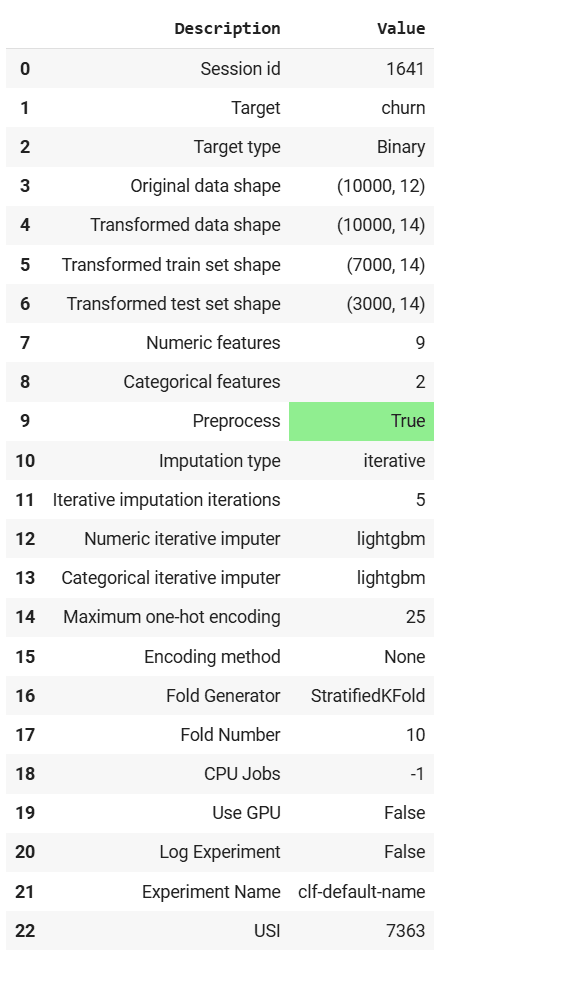
The setup() function initializes the pipeline and handles all the necessary preprocessing steps. Here’s an example of how to use it:
1
2
3
4
5
6
7
8
9
from pycaret.classification import setup,compare_models
clf=setup(
data=data,
target='churn',
normalize=True,
polynomial_features=True,
remove_multicollinearity=True,
)
Key parameters:
preprocess=True: This enables the automatic preprocessing of the dataset before training the model
normalize=True: This option scales the numerical features of the dataset to a common scale, typically between 0 and 1
polynomial_features=True: When this is set to True, PyCaret generates polynomial features based on the existing numerical features
remove_multicollinearity=True: This removes highly correlated features to prevent multicollinearity, which can lead to model instability
Step 4: Comparing Models
After the setup, you can use compare_models() to compare the performance of different machine learning models and select the best one:
1
best_model=compare_models()
The output shows a comparison of different machine learning models. It displays performance metrics like accuracy, AUC, and F1 score for each model.
Advanced Configurations in PyCaret
PyCaret also lets you adjust the feature engineering process to fit your specific needs. Here are some advanced settings you can customize:
Custom Imputation
You can specify the imputation strategy for missing values:
PyCaret automatically selects features to identify and remove less important features.
Benefits of Automated Feature Engineering in PyCaret
Some of the benefits of using PyCaret in conjunction with its automated feature engineering functionality include:
Efficiency: PyCaret automates many time-consuming tasks such as handling missing data, encoding variables, and scaling features
Consistency: Automating repetitive tasks ensures that preprocessing steps are consistent across different datasets, reducing the risk of errors and ensuring reliable results
Improved Model Performance: By automatically engineering features and uncovering hidden patterns, PyCaret can significantly boost the predictive performance of models, leading to more accurate predictions
Ease of Use: With its intuitive interface, PyCaret makes feature engineering accessible to both novice and experienced users, enabling them to build powerful machine learning models with minimal effort
Best Practices and Considerations
Keep these best practices and other considerations in mind when working on your automated feature engineering workflow:
Understand the Defaults: It’s important to understand PyCaret’s default settings so that you can adjust them based on your specific requirements
Evaluate Feature Impact: Always assess the impact of engineered features on model performance, and use tools like visualizations and interpretability methods to ensure that the transformations are beneficial
Fine-Tune Parameters: Experiment with different settings in the setup() function to find the optimal configuration for your dataset and modeling task
Monitor Overfitting: Be cautious about overfitting when using automated feature interactions and polynomial features; cross-validation techniques can help mitigate this risk
Conclusion
Automated feature engineering in PyCaret simplifies machine learning by handling tasks like filling missing values, encoding categorical data, scaling features, and detecting outliers. It helps both beginners and experts build models faster. PyCaret also creates feature interactions, reduces dimensions, and selects important features to improve performance. Its user-friendly interface and customizable options make it flexible and efficient.
Use PyCaret to speed up your machine learning projects and get better results with less effort.












Great