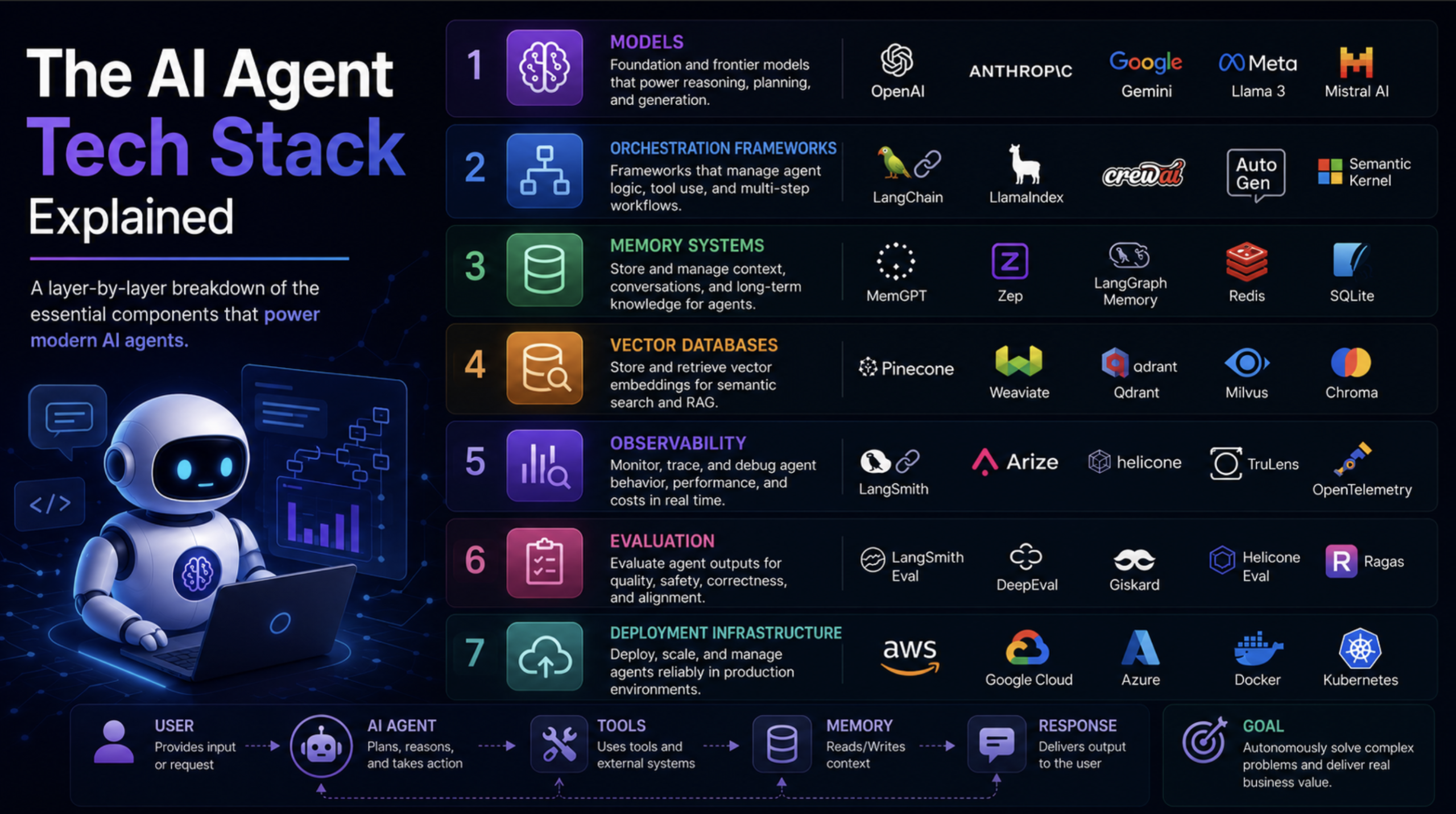
In this article, you will learn how the seven layers of a production AI agent stack fit together, from the foundation model down to deployment infrastructure.
Topics we will cover include:
What each layer of the stack does, from the foundation model and orchestration framework through memory, retrieval, tools, observability, and deployment.
How to implement each layer with working code, including a stateful agent, a memory system, a RAG pipeline, custom tools, and tracing.
Which combination of technologies to use at each layer depending on whether you are prototyping, scaling a startup, or operating in an enterprise environment.
Introduction
Picture this: you ask an AI agent to research three competitors, pull the pricing data from each of their websites, summarize the findings into a structured report, and drop it in a Slack channel by 9am. You hit enter. Thirty seconds later, the report is there.
What just happened under the hood is not magic, and it is not one thing. It is seven distinct layers of technology working in sequence, each one handling a specific job, each one capable of breaking in its own specific way. The model at the top gets all the attention. The six layers beneath it are what determine whether the agent actually works.
According to Gartner, 40% of enterprise applications will be integrated with task-specific AI agents by the end of 2026, up from less than 5% in 2025. That is not a gradual curve. That is a near-vertical adoption line, and the engineers and technical leads responsible for those deployments need to understand the full stack, not just the layer they happen to own.
This article goes through each layer in order, from the foundation model down to deployment infrastructure. By the end, you will know what every piece is, why it exists, how the layers connect to each other, and what to actually use at each level.
Layer 1: The Foundation Model
The foundation model is the cognitive core of an agent. It is where reasoning happens, language is understood, and decisions about what to do next are made. Everything else in the stack is either feeding context into it or acting on what it produces.
GPT-5.5 is fast for everyday calls and reliable at tool-calling, and it has the most mature ecosystem of integrations and the widest community of developers who have already run into and solved the edge cases you will encounter. Claude Sonnet 4.6 handles long documents and nuanced instruction-following well at a lower price point than Anthropic’s Opus tier, which matters in document-heavy workflows; reach for Claude Opus 4.8 when a task needs deeper, longer-horizon reasoning. Gemini 3.1 Pro has a 1 million token context window, which is relevant if your agent needs to process large codebases or lengthy knowledge bases in a single pass. Open-weight models like Llama 4 give you full control over deployment and data residency, at the cost of the infrastructure overhead of running them yourself.
There is no longer a hard split between “standard” and “reasoning” model families, the way there was in 2025; OpenAI, Anthropic, and Google have each folded reasoning into a single model that decides how long to think. GPT-5.5 ships with adjustable reasoning effort levels (from none up to xhigh), and the same applies to Claude’s effort parameter and Gemini’s thinking levels. For most agent workflows, the default or low-effort setting is the right choice: fast and cheap. For tasks that require careful planning or mathematical reasoning, dialling the effort level up earns back its cost in correctness.
Layer 2: The Orchestration Framework
If the foundation model is the brain, the orchestration framework is the nervous system. It handles the control flow: deciding what the agent should do next, when it should call a tool, how it should handle the result, and how the whole reasoning loop stays coherent across multiple steps.
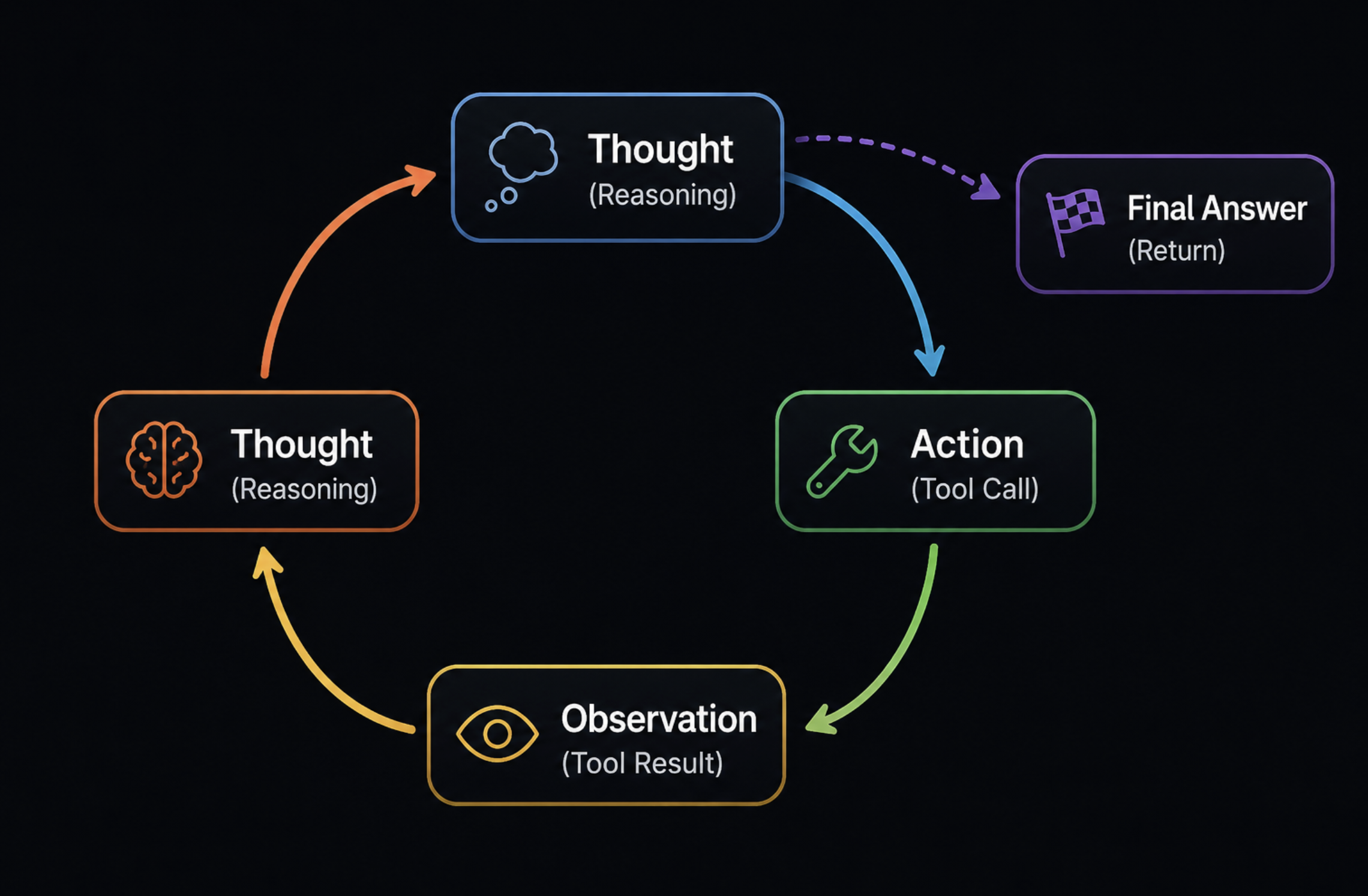
The pattern that most frameworks implement is called ReAct (Reasoning and Acting). The agent produces a thought, decides on an action, executes the action through a tool, observes the result, and then thinks again. This loop repeats until the agent produces a final answer. It sounds simple. In practice, it is where most production failures occur: the agent calls the wrong tool, gets stuck in a loop, or fails to recognise when it has enough information to stop.
LangChain is the most widely adopted framework. It offers a large ecosystem of integrations and good documentation. The criticism that it adds too much abstraction is fair at the prototype stage, but less relevant once you need the features that abstraction provides. LangGraph, built by the same team, is better suited for stateful multi-agent workflows where you need fine-grained control over the execution graph. If your agent involves multiple specialists coordinating on a task, LangGraph is the cleaner choice.
CrewAI is designed specifically for multi-agent coordination. It lets you define agents with roles, assign them tasks, and have them collaborate within a structured workflow. It is higher-level than LangGraph and faster to get running, but gives you less control over the execution details. AutoGen, from Microsoft, takes a conversational approach to multi-agent systems. Agents interact with each other through a message-passing interface, which makes the interaction logic very readable.
Semantic Kernel is Microsoft’s enterprise-focused option, with production-ready support for C#, Python, and Java. If you are operating in an enterprise environment already running on the Microsoft stack, it fits naturally. LlamaIndex started as a document ingestion and retrieval framework and has since grown into a full agent framework, with particularly strong support for RAG-heavy workflows.
The right choice depends on what your agent needs to do. For a single-agent task runner: LangGraph or LangChain. For a coordinated team of specialized agents: CrewAI or AutoGen. For enterprise environments: Semantic Kernel. For document-heavy retrieval workflows: LlamaIndex.
Here is a minimal working agent in LangGraph that handles tool use and maintains state.
How to run: Save as agent.py, add your OPENAI_API_KEY to a .env file, then run python agent.py
1
2
3
4
5
6
7
8
9
10
11
12
13
14
15
16
17
18
19
20
21
22
23
24
25
26
27
28
29
30
31
32
33
34
35
36
37
38
# agent.py
# Minimal stateful agent with tool use built on LangGraph
# Python 3.10+ | LangGraph 0.2+ | LangChain 0.3+
import os
from dotenv import load_dotenv
from langchain_openai import ChatOpenAI
from langchain_community.tools import DuckDuckGoSearchRun
from langchain_core.messages import HumanMessage
from langgraph.prebuilt import create_react_agent
# Load API key from .env file
load_dotenv()
# Initialize the language model
# temperature=0 for deterministic, focused responses in agentic tasks
llm=ChatOpenAI(
model="gpt-5.5",
temperature=0,
api_key=os.getenv("OPENAI_API_KEY")
)
# Register the tools the agent can use
# DuckDuckGoSearchRun requires no API key -- good for development
tools=[DuckDuckGoSearchRun()]
# create_react_agent from LangGraph wires together the LLM,
# tools, and a built-in ReAct loop -- no boilerplate required
agent=create_react_agent(llm,tools)
# Run the agent with a sample query
# The agent will decide whether to use a tool based on the question
result=agent.invoke({
"messages":[HumanMessage(content="What is the current market cap of Nvidia?")]
})
# The final response is the last message in the messages list
print(result["messages"][-1].content)
What this does:create_react_agent handles the full ReAct loop automatically. The agent receives the question, decides it needs current data, calls the DuckDuckGo search tool, reads the result, and synthesizes a final answer. The messages list in the output contains the full trace of that reasoning process.
Layer 3: Memory Systems
Statelessness is the default behavior of any LLM. Every call starts from scratch, with no knowledge of what came before unless you explicitly pass that context in. For a one-shot question, that is fine. For an agent that needs to track a conversation, remember a user’s preferences, or build on work it did yesterday, it is a fundamental problem.
According to Atlan’s research on AI agent memory, 95% of enterprise generative AI pilots delivered zero measurable ROI in 2025, with failure attributed to context readiness rather than model quality. Agents are failing not because the model is wrong, but because the memory layer is not there.
There are four types of memory in a production agent, and each one handles a different job:
Working memory (in-context) is the active context window. It holds the current conversation, any documents you have passed in, and the results of recent tool calls. It is fast and requires no infrastructure, but it is session-bound. When the session ends, it is gone.
Episodic memory is a log of prior interactions. As described in the research on memory types, episodic memory stores what happened: timestamp, task, actions taken, outcome. This is what allows an agent to answer “What did we work on last Tuesday?” or “What did the user say about this project three sessions ago?“
Semantic memory is factual knowledge stored externally, including definitions, entity relationships, and domain-specific facts that the model was not trained on. This is where your RAG pipeline feeds in (more on that in the next layer).
Procedural memory encodes workflows and tool-use patterns, repeatable behaviors the agent should always follow. This lives in the system prompt or a version-controlled instruction file, and it shapes every response the agent produces.
Here is how to implement working and episodic memory together using LangChain’s recommended pattern for LangChain 0.3+:
print(chat("My name is Alex and I'm building a RAG pipeline for legal documents."))
print(chat("What's the best vector database for my use case?"))
print(chat("What did I tell you I was building?"))# Tests episodic recall
What this does: The episodic_store acts as a lightweight persistent log that gets summarized into the system prompt on every call. The working_memory list holds the in-session message history and gets trimmed by trim_messages before each LLM call to prevent token overflow. The final test question, “What did I tell you I was building?” verifies that episodic recall is working correctly even after the context window has moved on.
Layer 4: Vector Databases and Retrieval (RAG)
Foundation models know a lot, but they do not know your documents. They were not trained on your internal knowledge base, your customer support history, your proprietary research, or anything that has happened since their training cutoff. Retrieval-Augmented Generation (RAG) is how you fix that.
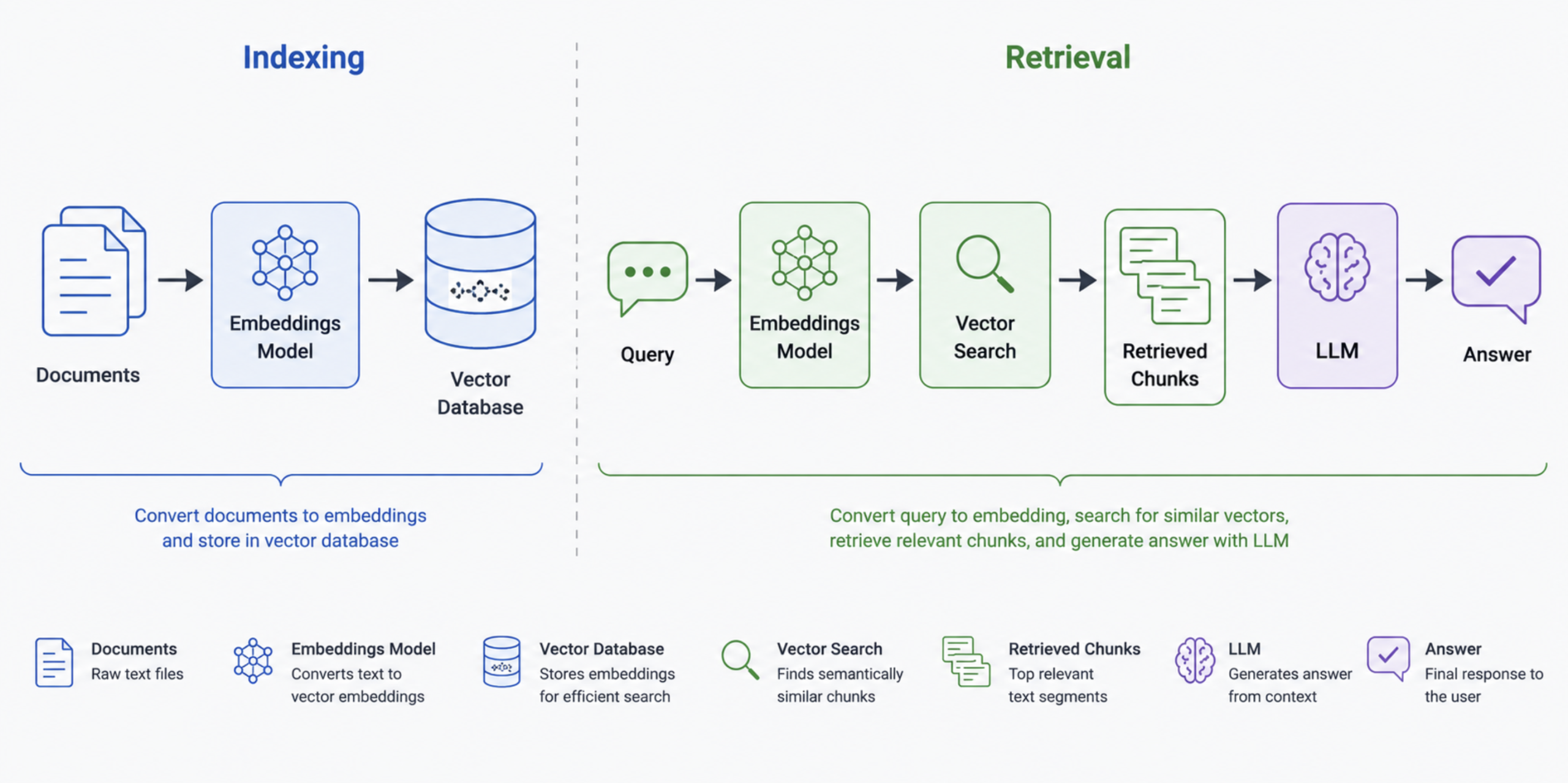
The concept is straightforward: instead of trying to fit an entire knowledge base into the context window, you convert your documents into numerical representations (embeddings), store them in a vector database, and retrieve only the most relevant chunks at query time. The agent gets a context window full of precisely the right information rather than everything you have ever written.
The leading options each serve a different use case:
Pinecone is fully managed with zero infrastructure overhead. You pay for it, push vectors to it, and query it. At 100 million vectors, it maintains recall without tuning. The right choice when you want to ship and not think about infrastructure.
Weaviate is open-source with a managed cloud option, and it leads the field on hybrid search combining vector similarity, keyword matching (BM25), and metadata filtering in a single query. If your retrieval needs require more than pure semantic search, Weaviate handles it natively.
Chroma is developer-first and runs locally with no infrastructure. The 2025 Rust rewrite made it significantly faster. It is the right choice for prototyping and small-to-medium production workloads where developer experience matters more than scale.
pgvector is a PostgreSQL extension that adds vector search to a database you may already be running. If your team already runs Postgres, pgvector is the lowest-friction path to production RAG. It handles millions of vectors with HNSW indexing and stays within single-node PostgreSQL limits for most production workloads.
A horizontal three-step flow diagram showing the RAG pipeline: Documents → Embeddings Model → Vector Database (click to enlarge)
Here is a working RAG pipeline using Chroma and OpenAI embeddings.
q="Which vector database should I use if I already run PostgreSQL?"
print(f"Q: {q}\nA: {answer(q)}")
What this does: The pipeline has two phases. During indexing, documents are chunked, converted to embeddings via OpenAI’s text-embedding-3-small model, and stored in a local Chroma database. During retrieval, the query is embedded using the same model, the three most similar chunks are pulled from Chroma, and the LLM uses those chunks and only those chunks to answer. The persist_directory parameter means Chroma saves the vectors to disk, so you do not pay to re-embed your documents on every run.
Layer 5: Tools and External Integrations
An agent without tools is a very expensive text predictor. Tools are what give agents the ability to act on the world rather than just talk about it.
In technical terms, a tool is a function that the model can choose to call. You describe what the function does in natural language, define its input parameters with a schema, and the model decides when calling that function would help it answer the question. The model does not execute the function; your code does. The model just decides when and with what arguments.
The categories of tools that matter most in production agents are: web search (for current information), code execution (for calculation and data processing), file I/O (for reading and writing documents), API calls (for connecting to external services), and browser use (for interacting with web interfaces that do not have APIs).
One development worth understanding is the Model Context Protocol (MCP), introduced by Anthropic in late 2024. MCP is a standardized way for models to communicate with external tools and data sources. Rather than every team writing custom integration code for every tool, MCP provides a shared protocol. Amazon Bedrock Agents added native MCP support in 2025, and adoption across the ecosystem is growing fast.
The single most important thing about tool design is the schema. The model decides whether to use a tool based on its description and decides what arguments to pass based on the parameter schema. A vague description produces wrong tool calls. A well-typed schema with clear parameter descriptions produces reliable ones.
What this does: Three tools are registered: a web search tool for current events, a weather tool that calls a free API with no key required, and a calculator that safely evaluates mathematical expressions. The agent receives each query, reasons about which tool to use, calls it, and synthesizes an answer from the result. The key design detail to notice is in the docstrings; each tool description is precise about what the tool does, when to use it, and what format the input should take.
Layer 6: Observability and Evaluation
Here is a production truth that does not get said enough: LLMs fail silently. As the team at Kanerika put it, a hallucinated answer still returns HTTP 200. A standard infrastructure monitoring tool sees a successful request. You see nothing unusual. Meanwhile, your agent has been confidently giving wrong answers for three days.
Traditional monitoring was built for a world where “correct” is binary: the function returned the right type, the API returned 200, the query completed in under 100ms. LLM correctness is semantic. The response can be structurally valid, grammatically fluent, and completely wrong. That requires a different observability layer entirely.
There are three things a good LLM observability setup tracks. Tracing follows every step of the agent’s execution: the LLM calls, the tool invocations, the retrieval queries, the intermediate reasoning steps, and how long each one took. Evaluation scores the output against metrics that matter: faithfulness (did it stay grounded in the retrieved context?), relevance (did it answer the question asked?), and hallucination rate. Monitoring tracks behavioral drift over time, whether the agent’s performance on a given class of inputs is getting better or worse as the model and prompts evolve.
The leading platforms each have a different strength. LangSmith provides the deepest integration with LangChain and LangGraph. If you are already in that ecosystem, it is the fastest path to working traces. Langfuse is open-source with over 19,000 GitHub stars and an MIT license, self-hostable, and works with any framework. Arize Phoenix brings ML-grade evaluation rigor and ships with over 50 research-backed metrics covering faithfulness, relevance, safety, and hallucination detection.
According to MLflow’s analysis of observability platforms, the right choice often comes down to your framework: LangChain teams get the most from LangSmith, while teams on LlamaIndex or raw API calls are better served by Phoenix or Langfuse.
Here is how to add Langfuse tracing to an existing agent with minimal changes.
Sign up at langfuse.com for a free account and add LANGFUSE_PUBLIC_KEY and LANGFUSE_SECRET_KEY to your .env. Self-hosting is also available if you prefer to keep data on your own infrastructure.
How to run: Save as observability.py and run python observability.py. Open your Langfuse dashboard to see the trace.
1
2
3
4
5
6
7
8
9
10
11
12
13
14
15
16
17
18
19
20
21
22
23
24
25
26
27
28
29
30
31
32
33
34
35
36
37
38
39
40
41
42
43
44
45
46
47
48
49
50
51
52
# observability.py
# Adding Langfuse tracing to a LangChain agent
# Langfuse captures every LLM call, tool invocation, and token count automatically.
import os
from dotenv import load_dotenv
from langchain_openai import ChatOpenAI
from langchain_community.tools import DuckDuckGoSearchRun
from langchain_core.messages import HumanMessage
from langgraph.prebuilt import create_react_agent
# Langfuse integrates via the CallbackHandler pattern.
# It intercepts every LangChain event and sends it to your Langfuse dashboard.
callbacks=[langfuse_handler]# Attach the handler here -- this is the only change
)
tools=[DuckDuckGoSearchRun()]
agent=create_react_agent(llm,tools)
# ── RUN WITH TRACING ──────────────────────────────────────────────────────────
# Pass the handler in config so it traces tool calls as well as LLM calls.
# Without this, only the LLM calls are traced -- tool invocations are invisible.
result=agent.invoke(
{"messages":[HumanMessage(content="What is the latest version of Python?")]},
config={"callbacks":[langfuse_handler]}
)
print(result["messages"][-1].content)
# Flush ensures all traces are sent to Langfuse before the script exits.
# In a long-running server, this is handled automatically.
langfuse_handler.flush()
print("\nTrace sent to Langfuse. Check your dashboard at https://cloud.langfuse.com")
What this does: Two changes from a standard agent setup: the CallbackHandler is initialized with a session and user ID, and it is attached to both the LLM and the agent.invoke config. That is enough for Langfuse to capture the full trace of every LLM call, every tool invocation, token counts, latency, and the complete input/output at each step. Everything you need to debug a production failure or track quality drift over time.
Layer 7: Deployment Infrastructure
You can have a flawless agent in development that turns into a maintenance problem in production. The infrastructure layer is where that gap lives.
At a minimum, your agent should be containerized with Docker. Containers give you consistent behavior across environments, straightforward dependency management, and a clean path to any cloud deployment target. The alternative — shipping Python scripts with a requirements.txt and hoping the environment matches — creates a class of bugs that wastes engineering time disproportionate to the effort containerization would have taken.
For most production agents, you have two architectural options for the serving layer: a synchronous API or an async queue. A synchronous API (Flask or FastAPI) works when your agent completes in under a few seconds, and you can afford to hold the HTTP connection open.
When your agent involves multiple tool calls, long retrieval pipelines, or document processing that might take 30 to 60 seconds, an async queue (Celery, AWS SQS, or Google Pub/Sub) is the better choice. The client submits a job, gets a task ID back immediately, and polls for the result.
On the cloud side, all three major platforms now have managed agent infrastructure. Amazon’s AgentCore, which became generally available in October 2025, provides dedicated agentic infrastructure on AWS for memory management, tool execution, and session handling without provisioning servers. Google Vertex AI Agent Builder is the natural choice for teams already in the GCP ecosystem, with native Gemini integration and built-in observability. Azure OpenAI Service with Semantic Kernel is the enterprise default for Microsoft shops.
For cost management, three practices make the biggest difference: caching (returning stored responses for repeated identical queries rather than calling the model again), request batching (grouping non-urgent tasks to reduce per-call overhead), and setting max_iterations in your agent executor to prevent runaway loops from consuming tokens without bound.
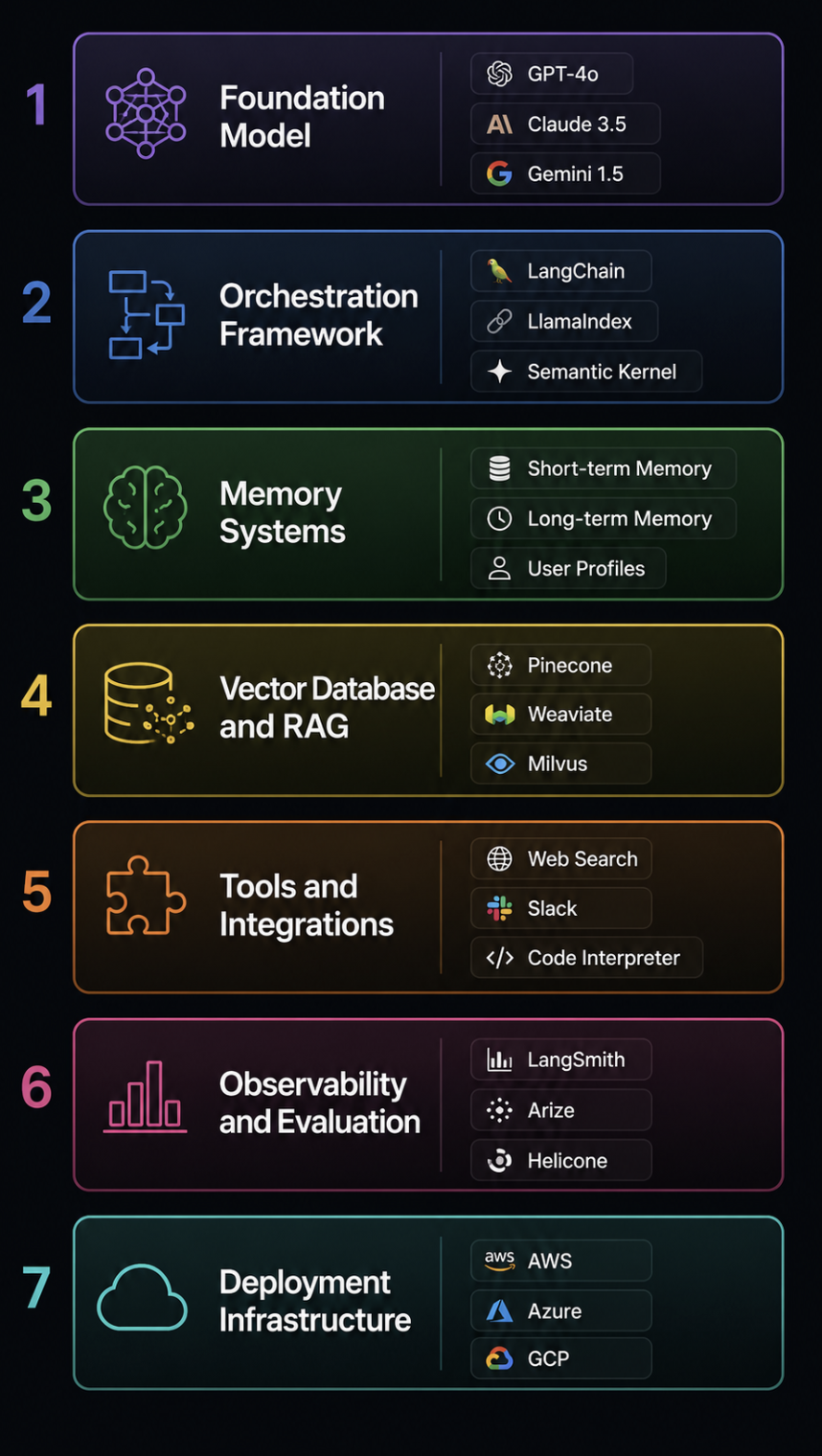
A vertical stack diagram showing all 7 layers labeled top to bottom: Foundation Model, Orchestration Framework, Memory Systems, Vector Database and RAG, Tools and Integrations, Observability and Evaluation, Deployment Infrastructure (click to enlarge)
Putting It All Together
The right choices at each layer depend on where you are in the project lifecycle. Here is a practical reference that reflects the research and trade-offs discussed above.
Prototype (move fast, minimal infrastructure):
Layer
Choice
Reason
Foundation Model
GPT-5.5
Reliable tool-calling, mature ecosystem
Orchestration
LangGraph
Fast setup, good documentation
Memory
In-context only
No infrastructure needed
Vector DB
Chroma
Local, no ops, good developer experience
Tools
DuckDuckGo + custom @tool functions
Zero API keys required
Observability
Langfuse (cloud free tier)
One-line setup
Deployment
Local / Docker
Ship fast
Production Startup (scale with control):
Layer
Choice
Reason
Foundation Model
GPT-5.5 + Claude Sonnet 4.6 fallback
Reliability with redundancy
Orchestration
LangGraph or CrewAI
State management and multi-agent support
Memory
Episodic (Postgres) + Semantic (RAG)
Full persistent context
Vector DB
Weaviate or Pinecone
Scale and hybrid search
Tools
Full tool suite with MCP
Standardized integrations
Observability
Langfuse self-hosted or Arize Phoenix
Data control + ML-grade evals
Deployment
Docker + Kubernetes + async queue
Production-grade, cost-controlled
Enterprise:
Layer
Choice
Reason
Foundation Model
Azure OpenAI or AWS Bedrock
Compliance, data residency, SLA
Orchestration
Semantic Kernel or LangGraph
Enterprise language support, governance
Memory
Managed memory with audit trail
Regulatory requirements
Vector DB
Weaviate or pgvector
Self-hostable, compliance-ready
Tools
MCP-based, internally approved
Security review and access control
Observability
Langfuse self-hosted or Datadog LLM module
Existing infrastructure integration
Deployment
AWS AgentCore / Vertex AI Agent Builder
Fully managed, governed, auditable
Conclusion
The foundation model is the part of this stack that gets written about. The other six layers are the parts that determine whether what you built actually works in production.
An agent fails at the orchestration layer when the ReAct loop gets stuck. It fails at the memory layer when it forgets the context it needs. It fails at the retrieval layer when the wrong chunks are returned, and the model hallucinates a grounded-sounding answer. It fails at the tools layer when a schema is too vague, and the model calls the wrong function. It fails at the observability layer when you have no way to know that any of this is happening. And it fails at the deployment layer when the infrastructure cannot handle the latency or cost requirements of real traffic.
Gartner estimates that over 40% of agentic AI projects are at risk of cancellation by 2027 due to unclear value, rising costs, and weak governance. Most of those failures will trace back not to a bad model choice but to a stack that was built layer by layer without a clear picture of how the layers connect.
Understanding the full stack does not mean you have to build all of it. It means you know what decisions you are making and what you are trading off when you make them. That is the difference between an agent that works in a demo and one that ships.




No comments yet.