
In this article, you will learn a practical, three-pillar framework for connecting large language models to external tools so your agents can read data, compute on it, and take real actions.
Topics we will cover include:
- What tool calling is and why it turns chatbots into capable agents
- How data access, computation, and action tools map to real production workflows
- Operational concerns such as security, HITL, error handling, and monitoring
On we go.
Mastering LLM Tool Calling: The Complete Framework for Connecting Models to the Real World
Image by Author
What Tool Calling Is and Why It Matters
Most ChatGPT users don’t know this, but when the model searches the web for current information or runs Python code to analyze data, it’s using tool calling. You just don’t see it happening behind the scenes.
Tool calling is the mechanism that lets large language models invoke external functions and APIs. It bridges the gap between language generation and real-world actions. Without tools, an LLM is limited to what it learned during training. With tools, it can access current data, take actions, and integrate with your systems.
There’s a key difference between pre-built systems and custom agents. ChatGPT comes with pre-installed tools you can’t modify or customize. When you build your own agents, you decide which tools to connect. Want your agent to query your company’s database? Add a SQL tool. Need it to send Slack messages? Connect the Slack API. This flexibility makes custom agents useful.
The workflow looks like this in practice. When a user makes a request, the LLM first recognizes it needs a tool. Then it selects which tool to use from its available options. Next, it executes that tool with the right parameters. Finally, it integrates the results back into its response. The whole process happens in seconds, but understanding these steps helps you debug when things go wrong.

Why does this matter for you as a developer? Because the difference between a chatbot that just talks and an agent that does things comes down to tool calling. RAG systems, autonomous workflows, and data analysis agents all rely on this core mechanism.
The Three-Pillar Framework: Data Access, Computation, and Actions
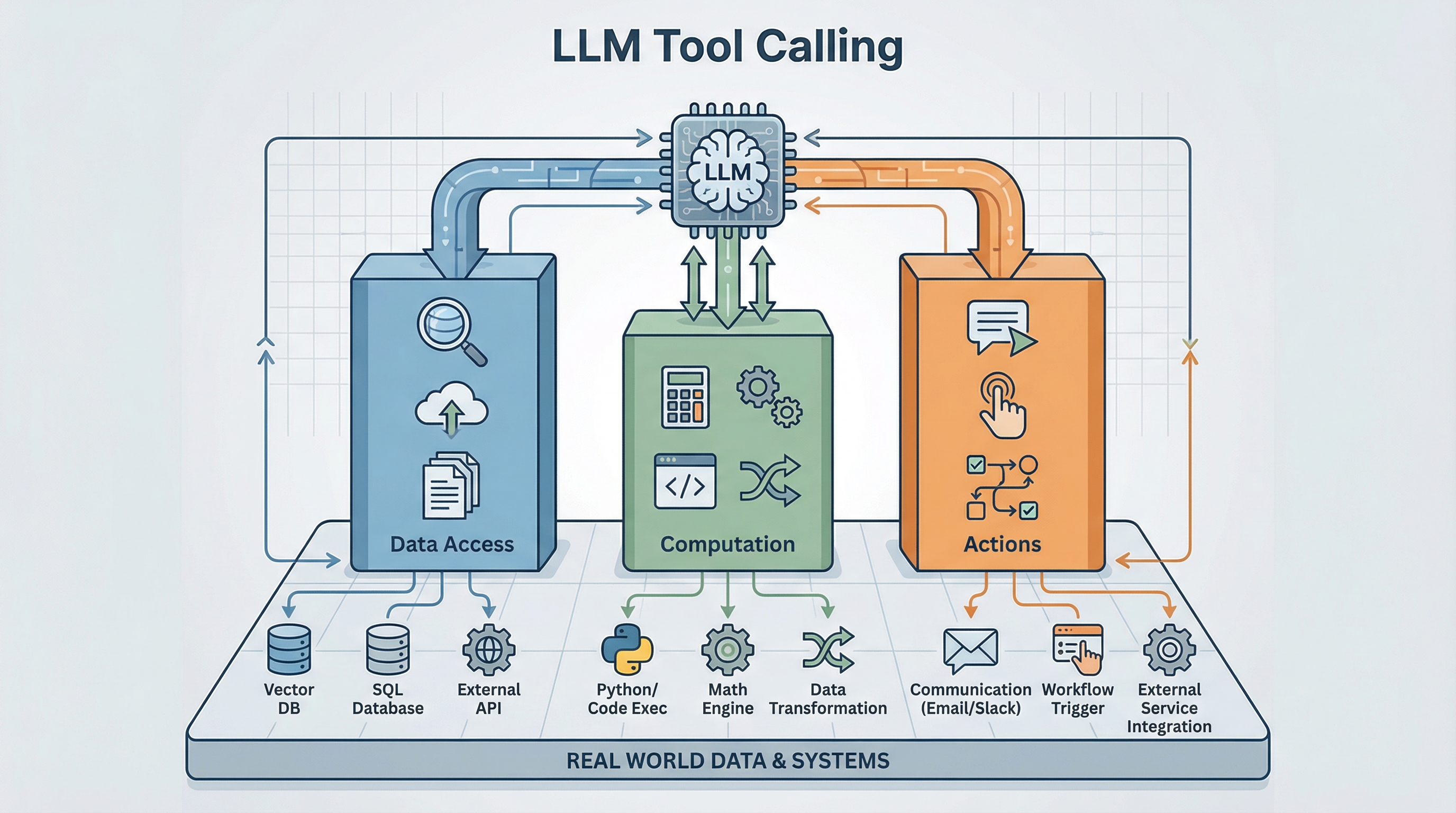
When you’re building an agent, you need a mental framework for organizing tools. Every tool falls into one of three categories based on what it does: data access, computation, or actions.
Pillar 1: Data Access Tools (Read-Only)
These tools retrieve information from external sources. They’re read-only, which means they’re safe to call repeatedly without side effects.
RAG fits in this framework like this: RAG is just tool calling. When your agent does RAG, it’s calling a vector database search tool. This helps clarify how RAG relates to broader agentic systems. It’s one tool type among many.
Vector databases handle semantic search. Use these when you’re searching unstructured content or need conceptual matches rather than exact keywords. A user asking “find documents about our Q3 strategy” benefits from vector search because it can match intent, not just keywords.
SQL and NoSQL databases handle structured queries. When you need transactional data, customer records, or anything with defined schemas, these are your go-to tools. They’re fast, reliable, and work well for precise lookups.
Graph databases excel at relationships. If your data involves connections (like social networks, knowledge graphs, or organizational hierarchies), graph databases let you traverse these relationships efficiently.
External APIs bring in third-party data. Weather services, stock prices, and news feeds. Anything that changes frequently and lives outside your systems needs an API tool.
File systems provide document access. Sometimes you just need to read files from storage. This comes up more often than you’d think, especially when dealing with reports, contracts, or reference materials.
When do you use each? Vector databases work well for unstructured or conceptual queries. SQL works best for transactional data where you know exactly what you’re looking for. Graph databases are your friend when relationships matter as much as the data itself. APIs handle real-time external data that you don’t control.
Pillar 2: Computation Tools (Process & Transform)
Data rarely comes back in the exact format you need. Computation tools analyze, calculate, and transform information between gathering and acting.
Code execution tools (Python, JavaScript) let your agent run calculations, process data, or apply complex logic. This is useful when you need custom transformations that no existing API provides.
Mathematical operations tools like Wolfram Alpha handle advanced math, symbolic computation, or scientific calculations. If your agent needs to solve equations or perform statistical analysis, these tools save you from reinventing the wheel.
Data transformation tools (ETL, parsing) convert data between formats. You’ll use these constantly: CSV to JSON, XML parsing, data cleaning, and format standardization.
ML model inference brings in specialized capabilities. Need image recognition, sentiment analysis, or classification? These tools let your main LLM work with other AI models as needed.
Media processing tools manipulate images, videos, or audio. Resizing images, extracting frames, and audio transcription. These tasks require specialized processing that computation tools provide.
Why does computation matter? Because data often needs processing before it’s useful for decision-making. You might retrieve sales data but need to calculate growth rates before determining next steps. You might fetch customer feedback but need sentiment analysis before crafting a response. Actions often require calculations first.
Pillar 3: Action Tools (Write/Execute)
Actions change state. They communicate externally, modify data, or trigger workflows. This is where things get real (and risky).
Communication tools send emails, Slack messages, SMS, or other notifications. These are common in customer service agents, alert systems, and collaboration tools.
Workflow automation tools create tickets, trigger pipelines, or kick off multi-step processes. Think Jira ticket creation, CI/CD pipeline triggers, or approval workflows.
Data manipulation tools update databases, modify records, or delete information. These require extra caution since they change your data state.
External service integrations handle payment processing, CRM operations, or other business-critical functions. These tools often have real financial or operational consequences.
The critical point about actions: they have consequences. An email sent can’t be unsent. A payment processed can’t be easily reversed. A database record deleted might be gone forever. This is why actions require different safety considerations than data access or computation. Common patterns you’ll see with actions include read-before-write (always verify state before changing it), conditional actions (only execute if certain conditions are met), and chained actions (multiple steps that must succeed together).
How the Three Pillars Work Together in Production
A real example: an autonomous customer service agent handling a delayed shipment complaint.
A customer contacts support saying their order is late and they want help. The three pillars work together like this.
Data Access phase: The agent first searches the knowledge base using vector search to find the refund policy. It queries the order database with SQL to get shipment details. Then it calls the shipping carrier’s API to check current tracking status. All of this is gathering context.
Computation phase: Now the agent calculates how many days the shipment is delayed. It evaluates refund eligibility based on the policy it found earlier. It determines the refund amount using the order value and any applicable rules. This transforms raw data into actionable insights.
Actions phase: The agent processes the refund through your payment provider. It sends a confirmation email to the customer. It updates your CRM with notes about what happened. Finally, it creates an internal ticket for the logistics team to investigate why the shipment was delayed.
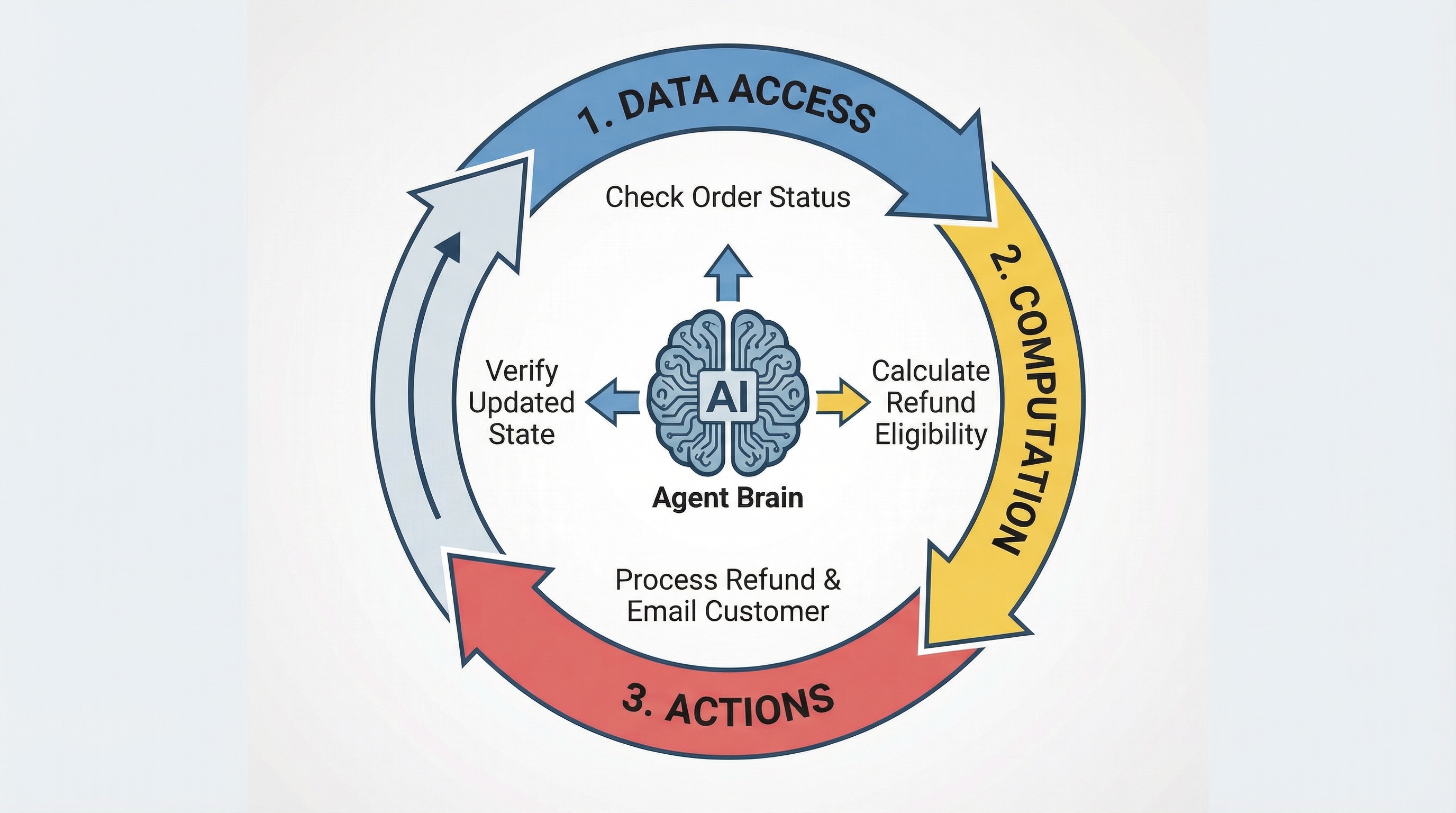
Notice the workflow isn’t strictly linear. After processing the refund, the agent might loop back to Data Access to verify the refund went through. Then it takes another Action to send the confirmation. This iterative pattern is common in production systems.
Each pillar depends on the others for complete autonomous execution. Data Access alone gives you an agent that can inform but can’t act. Actions alone give you an agent operating blindly without context. But combine all three? Now you’ve got a system that can gather information, make decisions, and execute tasks.
When designing your agent, ask yourself: does it have balanced capabilities across all three pillars? An agent with strong Data Access but weak Actions can answer questions but can’t help solve problems. An agent with strong Actions but weak Computation might take the wrong actions based on unprocessed data.
Tool Calling vs. Model Context Protocol (MCP)
There’s confusion about how MCP relates to tool calling, so here’s the distinction.
Tool calling is the mechanism (how agents invoke functions). MCP is a protocol (a standardized way to connect to tools). Tool calling is making phone calls, and MCP is the phone system’s standard for how calls should work.
When should you use MCP? If you’re building multiple integrations that need standardization, MCP saves you from reinventing connection logic each time. If you want to avoid writing custom code for each data source, MCP provides consistent interfaces. When building tools that multiple agents will use, MCP makes them reusable. In enterprise environments with many data sources, MCP brings order to potential chaos.
When should you skip MCP? For simple applications with just one or two tools, the overhead isn’t worth it. If you need ultra-low latency, MCP adds some overhead you might not want. Sometimes direct API calls are cleaner for your specific use case.
MCP is one way to implement tool calling. The three-pillar taxonomy we covered applies regardless of how you connect to tools (whether you’re using direct API calls, LangChain tools, framework integrations, or MCP). The framework is connection-agnostic.
Advanced Considerations for Production Agents
Building a demo agent is one thing. Running it in production is another. Here’s what you need to think about.
Security & Authorization
Every tool needs proper authentication. Use API keys, OAuth, or service accounts depending on what the tool requires. Follow the principle of least privilege. Give your agent only the minimum permissions necessary to do its job. This limits damage if something goes wrong.
Store credentials securely. Don’t hardcode API keys. Use environment variables or secret management systems. Rotate credentials periodically even if you haven’t detected any breaches.
Human-in-the-Loop (HITL)
Not all actions should be fully autonomous. Some operations are too high-stakes to run without human approval.
Require approval for financial transactions above a certain threshold. Make data deletion operations require confirmation. Keep external communications (especially customer-facing ones) under review until you’re confident in the agent’s judgment.
The goal isn’t to eliminate automation. It’s to balance automation benefits with risk management. Start with more human oversight, then gradually reduce it as you build confidence.
Error Handling & Resilience
Tools fail. APIs go down. Rate limits get hit. Timeouts happen. Your agent needs to handle these gracefully.
Implement retry logic with exponential backoff. If a tool fails, wait a bit, then try again. Don’t hammer a struggling service with repeated immediate requests.
Have fallback tools when possible. If your primary weather API is down, can you use a secondary one? If vector search times out, can you fall back to keyword search?
Design for graceful degradation. When a tool fails, what’s the best partial result you can provide? Clear error messages help users understand what went wrong and what they can do about it.
Monitoring & Observability
Track which tools get called, when they’re called, and whether they succeed or fail. This data is invaluable for debugging and optimization.
Monitor performance metrics: latency, API costs, and bottlenecks. Tools that are slow or expensive might need alternatives or caching strategies.
Set up alerts for unusual patterns. If an action tool that normally runs 10 times per day suddenly runs 1,000 times, something’s probably wrong.
Tool Selection Strategy
Start simple. Give your agent 3–5 essential tools to begin with. Too many tools confuse the agent. It has a harder time selecting the right one.
Add tools gradually based on observed needs. If you notice the agent struggling with a particular task type, that’s when to add a tool. Don’t try to anticipate every possible need upfront.
Balance the pillars. Don’t load up on Data Access tools while neglecting Computation and Actions. A well-rounded agent needs all three capabilities.
Next Steps
Apply this framework to your own projects.
Audit your current agent for missing pillars. Does it have strong Data Access but weak Actions? Can it gather information but not process it effectively?
Identify high-value tools to add based on what tasks your agent struggles with. Look at failed interactions or workarounds users have to perform manually.
Implement human-in-the-loop for consequential actions. Start conservative and loosen restrictions as you gain confidence.
Monitor and iterate. Use your observability data to guide improvements. The best agent architecture emerges through testing and refinement, not upfront perfect design.
Tool calling transforms large language models from language models into capable agents. The three-pillar framework (Data Access, Computation, and Actions) gives you a mental model for building balanced, production-ready systems. Start simple, monitor closely, and expand capabilities based on real needs.





No comments yet.