In this tutorial, we will explore Retrieval-Augmented Generation (RAG) and the LlamaIndex AI framework. We will learn how to use LlamaIndex to build a RAG-based application for Q&A over the private documents and enhance the application by incorporating a memory buffer. This will enable the LLM to generate the response using the context from both the document and previous interactions.
What is RAG in LLMs?
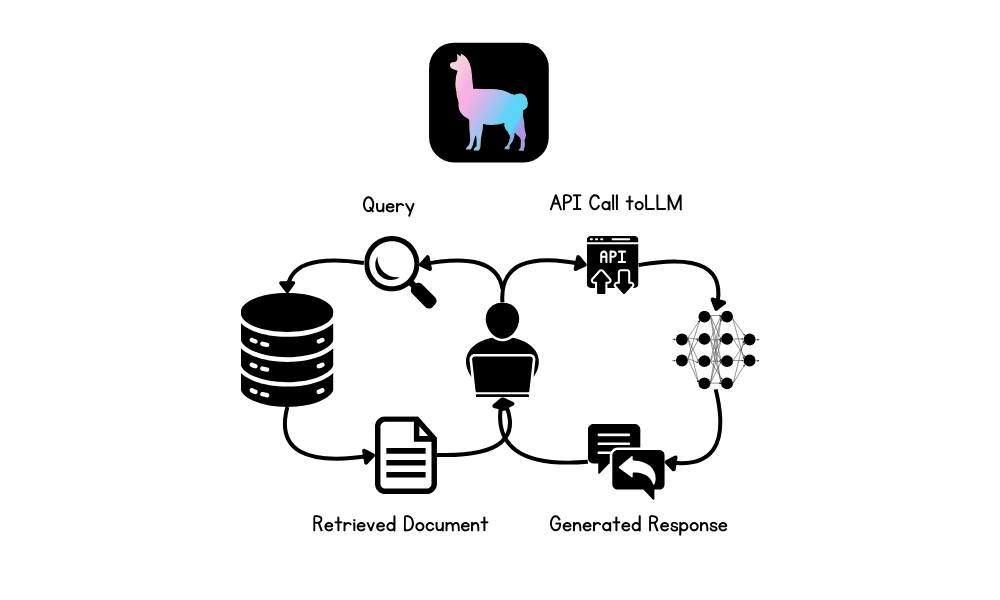
Retrieval-Augmented Generation (RAG) is an advanced methodology designed to enhance the performance of large language models (LLMs) by integrating external knowledge sources into the generation process.
RAG involves two main phases: retrieval and content generation. Initially, relevant documents or data are retrieved from external databases, which are then used to provide context for the LLM, ensuring that responses are based on the most current and domain-specific information available.
What is LlamaIndex?
LlamaIndex is an advanced AI framework that is designed to enhance the capabilities of large language models (LLMs) by facilitating seamless integration with diverse data sources. It supports the retrieval of data from over 160 different formats, including APIs, PDFs, and SQL databases, making it highly versatile for building advanced AI applications.
We can even build a complete multimodal and multistep AI application and then deploy it to a server to provide highly accurate, domain-specific responses. Compared to other frameworks like LangChain, LlamaIndex offers a simpler solution with built-in functions tailored for various types of LLM applications.
Building RAG Applications using LlamaIndex
In this section, we will build an AI application that loads Microsoft Word files from a folder, converts them into embeddings, indexes them into the vector store, and builds a simple query engine. After that, we will build a proper RAG chatbot with history using vector store as a retriever, LLM, and the memory buffer.
Setting up
Install all the necessary Python packages to load the data and for OpenAI API.
1
2
3
4
5
!pip install llama-index
!pip install llama-index-embeddings-openai
!pip install llama-index-llms-openai
!pip install llama-index-readers-file
!pip install docx2txt
Initiate LLM and embedding model using OpenAI functions. We will use the latest “GPT-4o” and “text-embedding-3-small” models.
1
2
3
4
5
6
7
8
from llama_index.llms.openai import OpenAI
from llama_index.embeddings.openai import OpenAIEmbedding
Set both LLM and embedding model to global so that when we invoke a function that requires LLM or embeddings, it will automatically use these settings.
1
2
3
4
5
from llama_index.core import Settings
# global settings
Settings.llm=llm
Settings.embed_model=embed_model
Loading and Indexing the Documents
Load the data from the folder, convert it into the embedding, and store it into the vector store.
1
2
3
4
5
6
7
from llama_index.core import VectorStoreIndex,SimpleDirectoryReader
Please convert the vector store to a query engine and begin asking questions about the documents. The documents consist of the blogs published in June on Machine Learning Mastery by the author Abid Ali Awan.
1
2
3
4
5
6
7
8
from llama_index.core<b>import</b>VectorStoreIndex
response=query_engine.query("What are the common themes of the blogs?")
print(response)
And the answer is accurate.
The common themes of the blogs are centered around enhancing knowledge and skills in machine learning. They focus on providing resources such as free books, platforms for collaboration, and datasets to help individuals deepen their understanding of machine learning algorithms, collaborate effectively on projects, and gain practical experience through real-world data. These resources are aimed at both beginners and professionals looking to build a strong foundation and advance their careers in the field of machine learning.
Building RAG Application with Memory Buffer
The previous app was simple; let’s create a more advanced chatbot with a history feature.
We will build the chatbot using a retriever, a chat memory buffer, and a GPT-4o model.
Afterward, we will test our chatbot by asking questions about one of the blog posts.
1
2
3
4
5
6
7
8
9
10
11
12
13
14
15
16
17
18
from llama_index.core.memory import ChatMemoryBuffer
from llama_index.core.chat_engine import CondensePlusContextChatEngine
"What is the one best course for mastering Reinforcement Learning?"
)
print(str(response))
It is highly accurate and to the point.
Based on the provided documents, the “Deep RL Course” by Hugging Face is highly recommended for mastering Reinforcement Learning. This course is particularly suitable for beginners and covers both the basics and advanced techniques of reinforcement learning. It includes topics such as Q-learning, deep Q-learning, policy gradients, ML agents, actor-critic methods, multi-agent systems, and advanced topics like RLHF (Reinforcement Learning from Human Feedback), Decision Transformers, and MineRL. The course is designed to be completed within a month and offers practical experimentation with models, strategies to improve scores, and a leaderboard to track progress.
Let’s ask follow-up questions and understand more about the course.
Building and deploying AI applications has been made easy by LlamaIndex. You just have to write a few lines of code and that’s it.
The next step in your learning journey will be to build a proper Chatbot application using Gradio and deploy it on the server. To simplify your life even more, you can also check out Llama Cloud.
In this tutorial, we learned about LlamaIndex and how to build an RAG application that lets you ask questions from your private documentation. Then, we built a proper RAG chatbot that generates responses using private documents and previous chat interactions.
Nice tutorial! Is it also possible to use a local LLM instead of the OpenAI API? due to privacy reasons I don‘t want to upload my data to OpenAIs servers…
Hi Thomas…Yes, it’s possible to use a local Large Language Model (LLM) instead of relying on the OpenAI API, which can be an excellent solution for privacy concerns. Running a local LLM allows you to keep your data entirely within your own infrastructure, avoiding the need to upload it to external servers.
### Options for Local LLMs:
1. **GPT-Neo/GPT-J by EleutherAI**
– **Description**: Open-source models that aim to replicate the capabilities of GPT-3. These models can be run locally and are available in different sizes, such as GPT-Neo and GPT-J.
– **Use Case**: Suitable for a variety of text generation tasks, and they can be fine-tuned on specific datasets.
– **Installation**: You can use frameworks like Hugging Face’s transformers library to load and run these models locally.
python

   from transformers import GPTNeoForCausalLM, GPT2Tokenizer
model = GPTNeoForCausalLM.from_pretrained("EleutherAI/gpt-neo-1.3B")
tokenizer = GPT2Tokenizer.from_pretrained("EleutherAI/gpt-neo-1.3B")
2. **LLaMA (Large Language Model Meta AI) by Meta**
– **Description**: LLaMA is a set of foundational models released by Meta, designed to be efficient and can be fine-tuned for specific tasks. These models are also available for local deployment.
– **Use Case**: Designed to be efficient and scalable, making them suitable for a wide range of NLP tasks.
– **Installation**: Requires access to Meta’s repository, and then the models can be loaded using libraries like transformers.
3. **GPT-2**
– **Description**: GPT-2 is a smaller version of the GPT family but still very powerful. It is easier to run on local machines with less computational power.
– **Use Case**: Suitable for general text generation and can be fine-tuned for specific tasks.
– **Installation**: Available via the Hugging Face transformers library.
4. **Alpaca/Koala Models**
– **Description**: These models are fine-tuned versions of LLaMA or other open-source LLMs, designed to perform well in specific contexts or with specific data.
– **Use Case**: Tailored for certain types of conversation or specific industries.
– **Installation**: These can be loaded locally and fine-tuned further if needed.
5. **Local Deployment Frameworks**
– **DeepSpeed**: A deep learning optimization library that can be used to train and infer large models efficiently on local machines.
– **Hugging Face Transformers**: A widely used library for working with transformer models, including loading and running them locally.
### Considerations:
– **Hardware Requirements**: Running LLMs locally, especially larger models, can be resource-intensive. You may need a machine with a powerful GPU or a cluster of machines.
– **Model Size**: Smaller models like GPT-2 or distilled versions of larger models may be more feasible for local deployment if hardware is a limitation.
– **Fine-Tuning**: If your use case requires specific domain knowledge, consider fine-tuning the model on your local data to improve performance.
### Example: Running GPT-2 Locally
python

from transformers import GPT2LMHeadModel, GPT2Tokenizer
model = GPT2LMHeadModel.from_pretrained("gpt2")
tokenizer = GPT2Tokenizer.from_pretrained("gpt2")
Running a local LLM is a viable solution for privacy-conscious applications, and with the available open-source models, you can maintain control over your data while still leveraging powerful language models.
One additional question: I am going to put results of an arbitrary model into a csv file and put it into a RAG, so people can ask queries to the LLM like „what is the aggregated output of the model for week 52“. Is this the best approach for this project and what of the aforementioned LLM is considered to performing best on this task?
from llama_index.core import VectorStoreIndex, SimpleDirectoryReader
# load documents
data = SimpleDirectoryReader(input_dir=”/content/data/data/”,required_exts=[“.docx”]).load_data()
# indexing documents using vector store
index = VectorStoreIndex.from_documents(data)
output:
APIConnectionError: Connection error.
idk why im facing this ….is there pre env selt-up tht im missing like setting an api key
from llama_index.core import VectorStoreIndex, SimpleDirectoryReader
# load documents
data = SimpleDirectoryReader(input_dir=”/content/data/data/”,required_exts=[“.docx”]).load_data()
# indexing documents using vector store
index = VectorStoreIndex.from_documents(data)
output:
APIConnectionError: Connection error.
idk why im facing this ….is there pre env selt-up tht im missing like setting an api key
Hi neon…The error you’re encountering, APIConnectionError, typically occurs when the code is trying to connect to an external service or API but is unable to do so. In the case of using VectorStoreIndex from llama_index, it’s likely that the code is attempting to access an external vector database or service that requires an API key or proper connection setup.
Here are a few steps to troubleshoot and resolve the issue:
### 1. **Check Dependencies and Installation:**
– Ensure that all required libraries and dependencies are correctly installed. You might need to install llama_index and other related packages if you haven’t done so already: bash
pip install llama_index
– Verify that you have installed any necessary libraries for vector stores (e.g., Faiss, Pinecone, or other vector databases).
### 2. **Check API Key and Connection Setup:**
– If the VectorStoreIndex is connecting to an external vector database (e.g., Pinecone, Milvus), you need to ensure that the API key and connection details are correctly set up.
– For example, if you’re using Pinecone, you need to set your API key like this: python
import pinecone
pinecone.init(api_key="your-api-key")
### 3. **Local Environment Setup:**
– If you’re running this in a cloud environment (like Google Colab), make sure that your environment is correctly configured to allow external connections. Some cloud environments might have restrictions or require special setup for outbound network requests.
### 4. **Inspect the Code:**
– Double-check the code to ensure there are no typos or issues in the path to the directory you’re reading from. For example: python
data = SimpleDirectoryReader(input_dir="/content/data/data/", required_exts=[".docx"]).load_data()
Make sure the directory and file paths are correct and accessible.
### 5. **Test Connection:**
– Try to create a simple connection to the vector database or API you’re using (if applicable) to see if the issue is with the connection or the specific VectorStoreIndex call.
If these steps don’t resolve the issue, you might need to look into the specific documentation or support channels for the llama_index package or the vector database service you’re using, as there might be additional setup or configuration steps required.
In a simple RAG (Retrieval-Augmented Generation) application using LlamaIndex, the role of GPT (or any large language model) is to act as the generator. It takes the retrieved context from a knowledge base or document and generates a natural language answer to the user’s question.
Here’s a breakdown of how the pipeline works and where GPT fits in:
—
Simple RAG Pipeline (with LlamaIndex):
1. User Input (Query)
Example: “What are the benefits of ISO 9001 certification?”
2. Retriever (LlamaIndex)
LlamaIndex searches using embeddings or keywords to find relevant chunks of data, which could come from PDFs, Notion pages, SQL databases, and more.
This step focuses the scope of the data so only what’s relevant to the question is retrieved.
3. GPT as Generator
GPT receives:
* The original question
* The retrieved context
It then generates a response using only the provided context. If prompted correctly, this helps prevent hallucination and keeps the answer grounded in the actual source material.
Example prompt to GPT:
Context: [retrieved document text]
Question: What are the benefits of ISO 9001 certification?
Answer:
—
Role of GPT in Summary:
* GPT is not the retriever — that task is handled by LlamaIndex or a vector database.
* GPT’s role is to compose the final answer, using the retrieved context.
* This is the “generation” part in Retrieval-Augmented Generation.





When you are publishing the course on genAI with advance RAG and agent using either langchain or llamaindex.
Hi Ved deo…Please ensure that you are subscribed to our newsletter so that we can let you know as soon as possible regarding new content!
https://machinelearningmastery.com/newsletter/
Nice tutorial! Is it also possible to use a local LLM instead of the OpenAI API? due to privacy reasons I don‘t want to upload my data to OpenAIs servers…
Hi Thomas…Yes, it’s possible to use a local Large Language Model (LLM) instead of relying on the OpenAI API, which can be an excellent solution for privacy concerns. Running a local LLM allows you to keep your data entirely within your own infrastructure, avoiding the need to upload it to external servers.
### Options for Local LLMs:
1. **GPT-Neo/GPT-J by EleutherAI**
– **Description**: Open-source models that aim to replicate the capabilities of GPT-3. These models can be run locally and are available in different sizes, such as GPT-Neo and GPT-J.
– **Use Case**: Suitable for a variety of text generation tasks, and they can be fine-tuned on specific datasets.
– **Installation**: You can use frameworks like Hugging Face’s
transformerslibrary to load and run these models locally.pythonfrom transformers import GPTNeoForCausalLM, GPT2Tokenizer
model = GPTNeoForCausalLM.from_pretrained("EleutherAI/gpt-neo-1.3B")
tokenizer = GPT2Tokenizer.from_pretrained("EleutherAI/gpt-neo-1.3B")
2. **LLaMA (Large Language Model Meta AI) by Meta**
– **Description**: LLaMA is a set of foundational models released by Meta, designed to be efficient and can be fine-tuned for specific tasks. These models are also available for local deployment.
– **Use Case**: Designed to be efficient and scalable, making them suitable for a wide range of NLP tasks.
– **Installation**: Requires access to Meta’s repository, and then the models can be loaded using libraries like
transformers.3. **GPT-2**
– **Description**: GPT-2 is a smaller version of the GPT family but still very powerful. It is easier to run on local machines with less computational power.
– **Use Case**: Suitable for general text generation and can be fine-tuned for specific tasks.
– **Installation**: Available via the Hugging Face
transformerslibrary.4. **Alpaca/Koala Models**
– **Description**: These models are fine-tuned versions of LLaMA or other open-source LLMs, designed to perform well in specific contexts or with specific data.
– **Use Case**: Tailored for certain types of conversation or specific industries.
– **Installation**: These can be loaded locally and fine-tuned further if needed.
5. **Local Deployment Frameworks**
– **DeepSpeed**: A deep learning optimization library that can be used to train and infer large models efficiently on local machines.
– **Hugging Face Transformers**: A widely used library for working with transformer models, including loading and running them locally.
### Considerations:
– **Hardware Requirements**: Running LLMs locally, especially larger models, can be resource-intensive. You may need a machine with a powerful GPU or a cluster of machines.
– **Model Size**: Smaller models like GPT-2 or distilled versions of larger models may be more feasible for local deployment if hardware is a limitation.
– **Fine-Tuning**: If your use case requires specific domain knowledge, consider fine-tuning the model on your local data to improve performance.
### Example: Running GPT-2 Locally
pythonfrom transformers import GPT2LMHeadModel, GPT2Tokenizer
model = GPT2LMHeadModel.from_pretrained("gpt2")
tokenizer = GPT2Tokenizer.from_pretrained("gpt2")
input_text = "Your custom text"
input_ids = tokenizer.encode(input_text, return_tensors="pt")
output = model.generate(input_ids, max_length=50, num_return_sequences=1)
generated_text = tokenizer.decode(output[0], skip_special_tokens=True)
print(generated_text)
Running a local LLM is a viable solution for privacy-conscious applications, and with the available open-source models, you can maintain control over your data while still leveraging powerful language models.
Thank you very much! I am going to try that out 🙂
One additional question: I am going to put results of an arbitrary model into a csv file and put it into a RAG, so people can ask queries to the LLM like „what is the aggregated output of the model for week 52“. Is this the best approach for this project and what of the aforementioned LLM is considered to performing best on this task?
APIConnectionError: Connection error.
idk why im facing this ….is there pre env selt-up tht im missing like setting an api key
from llama_index.core import VectorStoreIndex, SimpleDirectoryReader
# load documents
data = SimpleDirectoryReader(input_dir=”/content/data/data/”,required_exts=[“.docx”]).load_data()
# indexing documents using vector store
index = VectorStoreIndex.from_documents(data)
output:
APIConnectionError: Connection error.
idk why im facing this ….is there pre env selt-up tht im missing like setting an api key
from llama_index.core import VectorStoreIndex, SimpleDirectoryReader
# load documents
data = SimpleDirectoryReader(input_dir=”/content/data/data/”,required_exts=[“.docx”]).load_data()
# indexing documents using vector store
index = VectorStoreIndex.from_documents(data)
output:
APIConnectionError: Connection error.
idk why im facing this ….is there pre env selt-up tht im missing like setting an api key
Hi neon…The error you’re encountering,
APIConnectionError, typically occurs when the code is trying to connect to an external service or API but is unable to do so. In the case of usingVectorStoreIndexfromllama_index, it’s likely that the code is attempting to access an external vector database or service that requires an API key or proper connection setup.Here are a few steps to troubleshoot and resolve the issue:
### 1. **Check Dependencies and Installation:**
– Ensure that all required libraries and dependencies are correctly installed. You might need to install
llama_indexand other related packages if you haven’t done so already:bash
pip install llama_index
– Verify that you have installed any necessary libraries for vector stores (e.g., Faiss, Pinecone, or other vector databases).
### 2. **Check API Key and Connection Setup:**
– If the
VectorStoreIndexis connecting to an external vector database (e.g., Pinecone, Milvus), you need to ensure that the API key and connection details are correctly set up.– For example, if you’re using Pinecone, you need to set your API key like this:
pythonimport pinecone
pinecone.init(api_key="your-api-key")
### 3. **Local Environment Setup:**
– If you’re running this in a cloud environment (like Google Colab), make sure that your environment is correctly configured to allow external connections. Some cloud environments might have restrictions or require special setup for outbound network requests.
### 4. **Inspect the Code:**
– Double-check the code to ensure there are no typos or issues in the path to the directory you’re reading from. For example:
python

     data = SimpleDirectoryReader(input_dir="/content/data/data/", required_exts=[".docx"]).load_data()
Make sure the directory and file paths are correct and accessible.
### 5. **Test Connection:**
– Try to create a simple connection to the vector database or API you’re using (if applicable) to see if the issue is with the connection or the specific
VectorStoreIndexcall.If these steps don’t resolve the issue, you might need to look into the specific documentation or support channels for the
llama_indexpackage or the vector database service you’re using, as there might be additional setup or configuration steps required.What is the role of GPT in the simple ?
In a simple RAG (Retrieval-Augmented Generation) application using LlamaIndex, the role of GPT (or any large language model) is to act as the generator. It takes the retrieved context from a knowledge base or document and generates a natural language answer to the user’s question.
Here’s a breakdown of how the pipeline works and where GPT fits in:
—
Simple RAG Pipeline (with LlamaIndex):
1. User Input (Query)
Example: “What are the benefits of ISO 9001 certification?”
2. Retriever (LlamaIndex)
LlamaIndex searches using embeddings or keywords to find relevant chunks of data, which could come from PDFs, Notion pages, SQL databases, and more.
This step focuses the scope of the data so only what’s relevant to the question is retrieved.
3. GPT as Generator
GPT receives:
* The original question
* The retrieved context
It then generates a response using only the provided context. If prompted correctly, this helps prevent hallucination and keeps the answer grounded in the actual source material.
Example prompt to GPT:
   Context: [retrieved document text]

   Question: What are the benefits of ISO 9001 certification?

   Answer:
—
Role of GPT in Summary:
* GPT is not the retriever — that task is handled by LlamaIndex or a vector database.
* GPT’s role is to compose the final answer, using the retrieved context.
* This is the “generation” part in Retrieval-Augmented Generation.